
I’m going to try a format here that will make it easier for me to explain some of my spreadsheet tools, and give you an easy way to copy the header (you can adjust the column widths to suit your self). Please let me know if this works for you, and I’ll try some more of them.
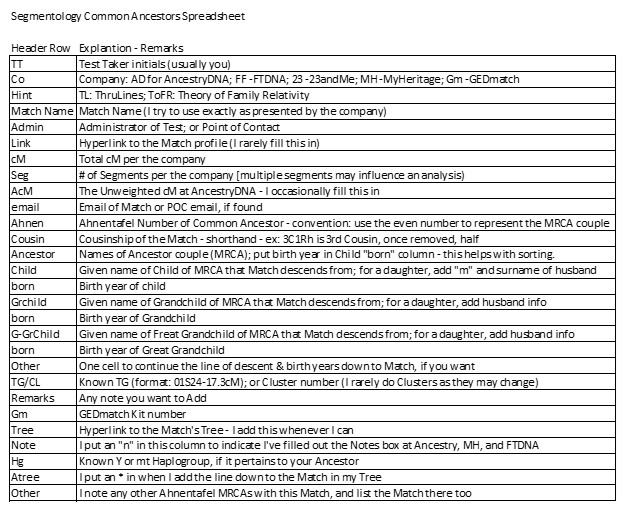
Copy the above column titled “Header Row” and paste it into your spreadsheet using the Transpose option. It should create the Header Row for the Common Ancestor Spreadsheet. [Edit: it appears this doesn’t work from the image above – so just type them in a row across a spreadsheet.]
There are several types of rows for you to input:
1. Include one row for each of your Ancestor Couples – I highlight these rows
2. There is one row for each Match with each known Common Ancestor (MRCA);
3. I add a row for my MRCA Child & birth year with a NOTE to refer to appropriate Ahnentafel for more
4. I add a row for Ancestor multiple marriages, and put marriage year in born column
This separates full cousins and half cousins.
5. If something looks fishy, or needs more investigation, I highlight it in orange/mud color.
6. If an Ancestor/Ahnentafel number and a TG are in conflict, I highlight it in red. The genealogy may be correct but the shared DNA segment did not come from the MRCA
Other NOTES:
1. The main sort for this spreadsheet is Ahnen + born+ born +born columns
NB: Highlight all columns before sorting.
2. Another sort is on Match Name to analyze multiple MRCAs – only one TG per MRCA
3. If you want to compare spreadsheets for different Test Takers, be sure to fill in the TT column first. Combine spreadsheets, sort, analyze, then sort on TT and separate the spreadsheets.
4. Sidebar: I have an Ancestor Spreadsheet – one row for each Ancestor info, including the Ahnentafel number!
5. I have typed all the data into my Common Ancestor spreadsheet – a lot of work
Idea: If you have a download of AncestryDNA Matches, start with that data for ThruLines Matches
6. If you want to be able to sort this by side (your paternal and maternal sides); add a column for P or M (or 2 or 3)
7. Do not hesitate to add any other columns (or rows) that may be useful to you. I made up this spreadsheet, feel free to change it as you like.
ADVANTAGES OF THIS COMMON ANCESTORS SPREADSHEET
1. It captures all of your Matches with Common Ancestors [some may be gone tomorrow…]
2. It arranges the Matches’ descendants from the MRCA like a Family Group Sheet
Easy to compare with your own research
Helpful in spotting many errors
Easy to see Matches who are relatively close cousins to each other – good conversation starter
Easy to highlight real and/or potential errors
Easy to spot a Match at two companies with different names
3. Shows TG threads in a family [maybe Clusters too, haven’t tried them yet)
Makes it easy to spot TG threads through a family (closer Ancestors will have more TG threads)
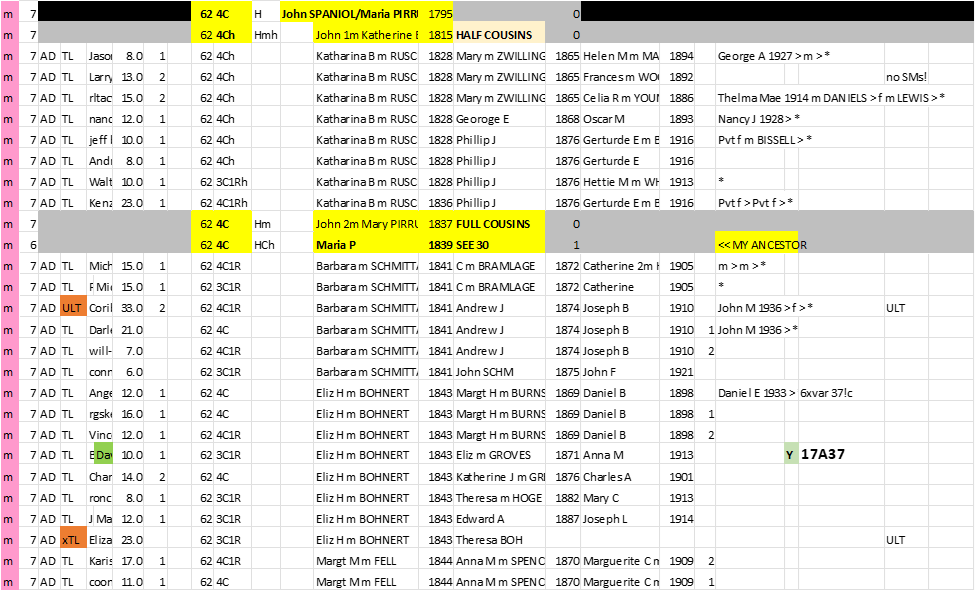
Here is an example from my CA Spreadsheet:
[35BC] Segment-ology: Common Ancestor Spreadsheet by Jim Bartlett 20211219
 segment-ology
I’m finally putting together a common ancestor spreadsheet and it’s very enlightening! Just curious – say you match a father and son. Do you add an entry for both or just the father? I can’t see much reason to add the son except that you’ll be more likely to recognize the name later.
Also, if you have multiple test takers do you like to add an entry for each test taker or just maybe put a note that says how many cM they share with the match?
LikeLike
Hi – thanks for sharing. In case it helps others here is my transcription of your image concerning header rows
Header Row Explanation – Remarks
TT Test Taker initials (usually you)
Co Company: AD for AncestryDNA; FF-FTDNA; 23-23andMe; MH-MyHeritage; Gm-GEDmatch
Hint TL: ThruLines; ToFR: Theory of Family Relativity
Match Name Match Name (I try to use exactly as presented by the company)
Admin Administrator of Test; or Point of Contact
Link Hyperlink to the Match profile (I rarely fill this in)
CM Total cM per the company
Seg # of Segments per the company [multiple segments may influence an analysis)
ACM The Unweighted cM at AncestryDNA – I occasionally fill this in
Email Email of Match or POC email, if found
Ahnen Ahnentafel Number of Common Ancestor – convention: use the even number to represent the MRCA couple
Cousin Cousinship of the Match – shorthand -ex: 3C1Rh is 3rd Cousin, once removed, half
Ancestor Names of Ancestor couple (MRCA); put birth year in Child “born” column-this helps with sorting.
Child Given name of Child of MRCA that Match descends from; for a daughter, add “m” and surname of husband
Born Birth year of child
Given name of Grandchild of MRCA that Match descends from; for a daughter, add husband info
Born Birth year of Grandchild
G-GrChild Given name of Great Grandchild of MRCA that Match descends from; for a daughter, add husband info
Born Birth year of Great Grandchild
Other One cell to continue the line of descent & birth years down to Match, if you want
TG/CL Known TG (format: 01524-17.3cM); or Cluster number (I rarely do Clusters as they may change)
Remarks Any note you want to Add
Gm GEDmatch Kit number
Tree Hyperlink to the Match’s Tree- I add this whenever I can
Note I put an “n” in this column to indicate I’ve filled out the Notes box at Ancestry, MH, and FTDNA
Hg Known Y or mt Haplogroup, if it pertains to your Ancestor
Atree I put an * in when I add the line down to the Match in my Tree
Other I note any other Ahnentafel MRCAs with this Match, and list the Match there too
LikeLike
Thanks, Anne – although this is close to what I use now, I’m always making adjustments. I’ve added three column that I can color code to indicate when Matches match each other in a family – this is basically a Cluster (most Matches match each other). I’ve also added a column for the most significant shared cM between two Matches: example: 3,469cM/Son of Match name. I feel this is important whenever the Match has no other way to link into my Tree – this Shared cM is the “proof”. Folks should feel free to make any adjustment to suit their own methods of analysis. Jim
LikeLike
The spreadsheet is an image – could you make it a true spreadsheet or table
LikeLike
Bonnie – a real spreadsheet would allow opening the Match names . I’ll email you. Jim
LikeLike
Hi, Jim, If a “fishy” alleged cousin turns out to be incorrect (documentation indictes other people’s trees are wrong plus lack of shared matches on the same line), do you leave them in your spreadsheet (with the orange color), or do you just delete them. The ones I have like that are based on short segments and might not be identical by descent.
LikeLike
I have left them in for now – several reasons: 1. I don’t want to trip over them again; 2. Often they will come up again elsewhere; 3. sometimes most of their info is OK and I can find a different CA; 4. in my position with this blog; I want to be able to sort and run stats (percent good vs bad for instance; 5. I’m a packrat…. Jim
LikeLike
Another question: How do you handle double cousins? Put them in under each set of ancestors with an indication that they are double cousins?
LikeLike
eallynm – YES. for one or the other I’d add a “SEE #” to refer to the place where I’d put all the cousin Matches (I don’t want to list the Matches twice). Jim PS: I made all this up, and have modified it along the way… If you develop an improvement, please let me/all of us know….
LikeLiked by 1 person
I think I’m going to go ahead and list the matches twice now that Ancestry is no longer showing us multiple possible relationships. Once one gets down to a few segments, the matching DNA may come from one set of CAs or another. I might highlight the SEE # if that’s the one that is the more likely source of the segment(s).
LikeLiked by 2 people
eallynm – I think your idea to highlight the most probable line for a DNA Match is a good one. Clustering (Shared Matches) may indicate the most likely line. Also, I would almost always pick the “closer” line if there is not any other hint. The best of all solutions is to get segment data (and therefore a Triangulated Group) for the shared DNA. Jim
LikeLike
Jim, what is the column to the right of cousinship that contains H Hmh Hm and HCh and what do those abbreviations mean?
LikeLike
eallynm – Good question… the H is my code for a HEADER ROW (not one of the Matches). H (plain) is an Ancestor HEADER. Hch means a child of the Ancestor (who is usually the child who is my Ancestor with Matches in a previous Family Group). Hm is a marriage (who is NOT an Ancestor – it indicates half-cousins below that Header); same for Hmh. I can sort all the Header rows out – to make sure they have a consistent pattern and/or to see all my Ancestors and any second marriages… Jim
LikeLiked by 1 person
What’s the difference between Hm and Hmh?
LikeLike
Does Hm mean that the ancestor had more than one marriage and Hmh indicate the header row for the half-cousins?
LikeLiked by 1 person
Yes, Hmh is another marriage (may be first or second) to someone who is not my Ancestor – thus the Matches below this header are Half Cousins. Note the other marriage may be a husband or a wife. It’s just a crib, that I enter once in the spreadsheet – to remind me, so I don’t have to scratch my head and review it each time it comes up. I’m also going back and adding in Y and mt Haplogroups where known. When I see someone with a long male or female line, I like to tell the the Haplogroups when I know them, and/or ask if they would be interested in testing to determine their “signature” Haplogroup… It all adds to the work of the spreadsheet, but also adds to it’s value as a tool. Suggested improvements always welcomed. Jim
LikeLike
Pingback: How Many NPEs Do You Have? | segment-ology