Pro Tools Part 9

Featured

Build A Foundation

I feel like I’ve been drinking though a fire hose – there are just so many good clues in the Shared Match cM lists. I’ve tried all of the four Plans of Action I previously laid out – and I’ve found myself still jumping from one to another – good clues are just too hard to pass up. And a parent/child, sibling, aunt/uncle/niece/nephew and even a 1C will suck me in like a magnet – particularly when one has NO Tree and another has a good Tree. AND, if I’m working in a small sub-branch so I know many of the collateral SURNAMES and the geography,  I’ve got to capture that info before I move on…

Observation 1: As I scroll through hundreds of Shared Match lists, I see lots of Shared Matches with the same MRCA I’m researching [almost all of my over-20cM Matches have a Note indicating a validated MRCA, or a likely/imputed one]. And I see lots of Shared Matches one generation up or one generation down. For instance, I’m working on my MRCA couple 40P, and I see Shared Matches that are also 40P, and Matches who are 20P and 80P and 82P. I shouldn’t be surprised, because we are all on the same ancestral line; AND a 20P Match who is a 3C (or 3C1R) with me, is also related to my Matches on 40P – maybe as 4C or 3C1R, etc. This is very comforting to see a Match with Shared Matches up and down one of my lines.

Observation 2: Each of the MRCAs that I focus on – usually for a few days – has seen a significant increase in the number of Matches that I can verify exactly how we are related. Plus, if they are closely related to a known Match AND have a bunch of Shared Matches with me along this same line, I can add them to my Common Ancestor Spreadsheet anyway, with confidence they are on the same sub-branch.  In any case, I’m winding up with a lot of Matches under each MRCA; and a lot of new Notes for them.

Recommendation/Tip: Combining 1 and 2 above, I now think the best path forward is to build the foundations and then work back in our Ancestry.  I have no 1C, so this means starting with my great grandparent MRCA couples and, using Pro Tools, teasing out as many Matches as possible for each one of my 4 MRCA couples [8P, 10P, 12M, 14M] – and adding their info into the Match Notes. Then, as I move to the next generation further back, I will see many of these Notes in the Shared Match lists for Match-cousins back to MRCAs16P to 30M. In general, the Shared Matches to these MRCAs will “stay in their lane,” and that is a strong indication. Remember, some Shared Matches may match you one way and match the base Match another way – those Matches will usually have a shorter, random list of Shared Matches – I skip over those quickly and move on.

Bottom Line: If we start with our closest MRCA couples and “Note” all the Matches we can, we’ve built a strong foundation for when we get to the next generation. This will become more and more valuable as we work out through more distant generations. I think such a foundation will be essential when we get to 4C and beyond.

[22CQ] Segmentology: Pro Tools Part 9 Build A Foundation; by Jim Bartlett 20240724
Pro Tools 8

Featured

Group Process

Here is (sorta) my process for working with a Match and their Shared Match list with me.

1. Pick a Match with an MRCA (I don’t have good criteria yet, but I like one with a good Tree; and it’s helpful to know that they have several close cousins in my Common Ancestor spreadsheet).

2. First pass: look though all of their Shared Matches for Notes that indicate they share the same MRCA.  [sometimes I note the shared cM in a new column; sometimes I just use a highlight color in a column – in either case to indicate a group with the Match in #1]

3. I’ll stop at any Match who is very close – parent/child; sibling; even aunt/uncle/niece/nephew. If not in my spreadsheet, I add them in and add appropriate Notes to their profile to highlight the MRCA and relationship to me – e.g. #A0038P/4C1R: ALLEN/Elizabeth.

4. Then I make another pass through the Shared Match list – opening the Matches who share above 90cM (generally within about 2C to the original Match in #1 above).  From my spreadsheet I know of other SURNAMES the other Matches have in their path back to the MRCA – so I’m looking for those surnames in addition to the MRCA surnames. For example: MOESZINGER led me to 4 other new Matches from my ALLEN MRCA.

5. Repeat #4 (a third pass) looking at above 50cM or so – digging a little more (and by this time, I usually have additional Matches with helpful Notes to play off of.

6. Now, start at the top of the #1 Shared Match list (a fourth pass), and open each Match who does share the MRCA with you. Look down each such Match’s Shared Match list with you, using the #4 process above. The idea here is that not every cousin will share with every other cousin (remember only 50% of all your true 4C will share DNA with you; 50% will not!). So using this step usually adds a few more Matches to the group. [If you use a highlight color column, all of the Matches in a part of a Common Ancestor spreadsheet should get colored in.]

7. If you’re working on a Brick Wall (or NPE or bio-Ancestor, etc), go through the remaining Matches who have Trees and jot down the SURNAME in their Trees. Look for a Common Ancestor among those (usually more distant) Matches, who would be a good potential for an Ancestor at or beyond the Brick Wall.

In each case above, I add new Matches to my Common Ancestor Spread Sheet (now about 7,000 from Ancestry), and add them (and their path) to my Ancestry Tree (they are always living and private).  

Sidebar: My Common Ancestor spreadsheet is a good tool for each family group based on an MRCA. I haven’t found a good way, yet, to analyze the Shared Matches who are related to me through the children or ancestors of the MRCA. However, I do note that they show up in the Shared Match list. For instance, I’m now working on my MRCA – 38P (this is the Ahnentafel representing Joseph ALLEN, along with his wife Elizabeth [39P on her own] – maiden name unknown). It’s comforting to note that many of the Shared Matches have Notes starting with #A0018P (an MRCA representing my Ancestor who married A19P, the daughter of 38P) and some close Matches with #A0008P), an even closer descendant of 38P. Normally, I would have some smaller cM Matches back to 76P and 78P (representing the two MRCA couples who are ancestors of 38P and 39P, but both 38P and 39P are brick walls…  So Group Process #7 above, is next on my list.  

The above is a classic example of the iterative nature of genetic genealogy, and the importance of having a good Note system that lets you see the key elements in a Shared Match list. It all comes back to doing the homework of keeping good, visible, Notes at Ancestry. Tip: I now add a Match’s SURNAMEs to the Notes if I don’t have any other clues – I can then see these SURNAMEs in the Notes fields in a Shared Match list…

Bottom Line: I think the Pro Tools Shared cM feature needs an iterative process of reviewing Shared Matches to add in as many new Matches as possible under our MRCA groups. This also includes noting Shared Matches closer and more distant to each MRCA group; and analyzing remaining (usually smaller cM) Matches to break through more distant Brick Walls. Lot’s to do….

[22CP] Segment-ology: Pro Tools Part 8 Group Process; by Jim Bartlett 20240719

Pro Tools Part 7

Featured

What Is Your Plan of Action?

The Pro Tools feature that lets us see the amount of DNA (in cMs) between our Shared Matches is a significant tool. It allows us to “stitch together” families, to include Matches with skimpy, or even no, Trees. This could potentially impact all my 96,000+ Matches. That’s a lot of ground to cover…

So what’s the game plan – how do we most efficiently use this new cM data? What is the Plan of Action (POA)?

I see four different POAs – and I’m seeking your input on any insights you’ve found so far.

1. Work down our Match list. Start at the top, and methodically work on each Match that we haven’t placed in our Tree. The advantage here is that the top Matches (most shared cM) are usually the easiest to figure out. With Pro Tools we can see their top Matches, potentially ones with good Trees, and often tease out their place in our Tree. At the least, even if we cannot find the exact relationship, we can figure out which sub-branch of our Tree they are on (which is all we really need to know for them to be helpful forming a tight group).

2. Confirm each MRCA couple group. I’ve been working on this method for a while, using my Common Ancestor Spreadsheet. The focus is on all the Matches who have the same MRCA couple – does each one share an appropriate amount of cMs with the others. I must take care when some Matches have multiple relationships with me (colonial Virginia ancestry) and/or multiple segments – these could throw off a one-to-one analysis. But the main point here is: does each Match “fit”? I’ve found 2 so far (out of hundreds), who really don’t “fit” within all the shared cMs – indicating incorrect genealogy or an NPE. Bottom line: it is very comforting to see a large list of Matches under an MRCA that all “fit” each other (well within the Shared cM Project ranges). Each such MRCA couple at one generation, then is a strong foundation when working on the next generation – many Matches will be related to each other across two (or more) generations. More “comfort”…

3. Focus on specific problems.  Work on an unknown bio-Ancestor/NPE/Brick Wall. Build an appropriate group, and then re-review the Shared Match list for highest-cM Matches that may be helpful – and then look at their Shared Matches for more clues. This POA may foster a lot of “rabbit holes” and “blind alleys”. But the main point here is: build a group of interlocking Matches – they will often lead to insights.

4. Hit-n-Miss. Have fun chasing random leads. These sometimes result in a floating branch of your Tree. I have two of these – many Matches which apparently form a large (several hundred) list of Matches from one person – probably an Ancestor of mine, but no known paper trail link. Pro Tools will confirm, or not, if this is an “interlocking” group. If so, then I will look for Matches in that huge group, who have shared Matches with some other, known, MRCA group(s) of mine – hopefully there will be a strong consensus – there should be…

[Side bar: early in my Navy career (1971), I needed a system to track a lot of projects (before PCs) – we had a table of milestones. I called it: the Hectic Input and Tabulation of Numerous Milestones in our Sacred System (HITNMISS) – my boss was not impressed; so I changed the name to the Simplified Work Input and Follow Through (SWIFT) – I got promoted:>j]

I think the unifying theme above is to form interlocking Matches into a family group based on shared cM – it’s right up our alley as genealogists. And each such group is a very valuable foundation, with important links in different generations (up and down our Tree).

Are you using any of the above POAs? Have you developed a different POA that you’ve found to be particularly effective and efficient, or not? What’s the best way to incorporate all this new data? Please share.

[22CO] Segment-ology: Pro Tools Part 7 What Is Your Plan of Action; by Jim Bartlett 20240717

Pro Tools Part 6

Featured

Watch Out…

BLUF: Do not rely strongly on Ancestry’s suggested relationships – I find the true relationship is rarely the top one in Ancestry’s long list of possibilities; and it’s usually down their list somewhat. The cMs with my Matches are always within the ranges in the Shared cM Project and at DNA Painter. But, again, they are rarely at the average.

I’m reviewing all my Matches at the 3C level: 79 Matches with A16 MRCA couple; 92 with A18; 43 with A20, so far. None have been found to be outside the range of inter-relationships (perhaps 50% sampling). All are inside the appropriate ranges. BUT, two siblings may show vastly different values – one somewhat higher and one somewhat lower than the average.  My engineer brain wants two siblings to have very close cMs, but the data is truly random (within the ranges of the Shared cM Project.

Bottom line: be careful, and don’t try to force a fit. Expect the values to be in the range for the relationship; but accept that they may be all over that range. And looking at it the other way, starting with a shared cM value, the relationship [of a Match without a Tree] will NOT necessarily (or even probably) be in a small set of Ancestry suggestions (although almost always on their long list – in the “Tree” view of a Match profile).

[22CN] Segment-ology: Pro Tools Part 6 Watch Out; by Jim Bartlett 20240711

Pro Tools Part 5

Featured

Small Segments At Work

I have Match A at 25cM with no Tree; but a nephew at 1773cM, Match B who has a Tree. Match B is a 3C3R on my Ancestor 16P.  Analysis of the 1950 census and his grandmother’s obit, gave me the same name as Match A and a place in my Tree. Match B is 9cM to me. Match B has another uncle at 1771cM, Match C. Match C is also listed by name in the grandmother’s obit. Match C is 8cM with me.  And, sure enough Match A and Match C share 2315cM [siblings] with each other [corrected 7/9/2024].

This is about as solid as it gets. Clearly the 9cM Match B and the 8cM Match C are true cousins to me, per genealogy. Each of these Matches share one DNA segment with me. Although this data doesn’t “prove” these 3 segments are the same and linked back to our MRCA 16P, I’d be willing to wager that an upload to GEDmatch would show these segments would Triangulate; and match many other segments from MRCA 16P.  In a genealogy sense it doesn’t matter: these Matches belong in my Tree – with or without a DNA link.

I find this example compelling. The old saw: when you hear hoofbeats, think horses. Yes, zebras are a possibility, but the odds in the USA are way in favor of horses.  These individuals show up as DNA Matches to me – they share a segment of DNA with me. Some segments are small, some are large. When they come from such a tight fit in one part of my Tree, I’m inclined to believe that they are the same segment. It is “possible” that they each got a randomly different segment, or even false segments, but the logical reasoning is that they share part of the same segment from an MRCA. Why not just accept that for now? Perhaps, someday, some alternative will come up – even so, it would not change the genealogy backed up by records.

Icing on the cake – in reviewing Match C’s shared Matches, Match D (8cM to me) is 3476cM (a daughter) of Match C – another add to my Common Ancestor spreadsheet and to my Tree.

Bottom Line: ProTools is providing a lot of great bread crumbs to follow; and linking a lot of small cM Matches to my Tree. Be sure to scroll to the bottom of a ProTools Shared Match list, looking for high cM interrelationships! Don’t discard genealogy “finds”, just because they share small cMs.

[22CM] Segment-ology: ProTools Part 5 Small Segments At Work; by Jim Bartlett 20240707

Pro Tools Part 4

Featured

The Spreadsheet

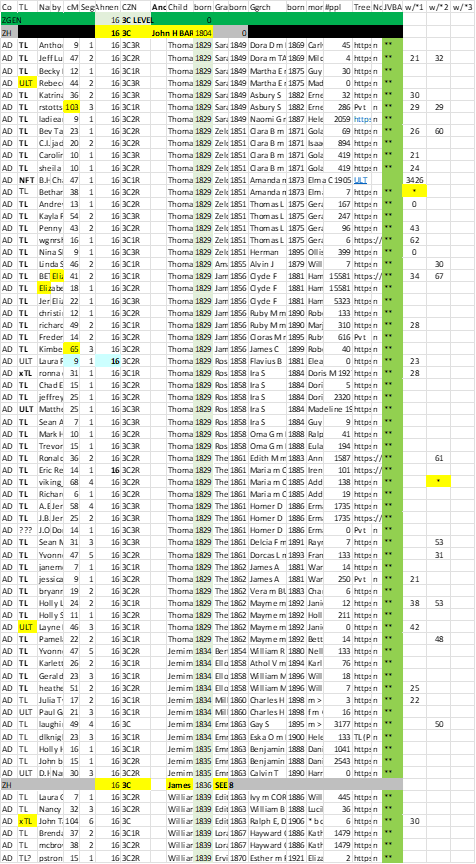
By popular request, below is a section of my Common Ancestor Spreadsheet. Shown are most of the essential columns, In order to fit the space I have in this blog, I’ve deleted a number of columns that I use to record, emails, TGs, Notes, Y or mtDNA possibilities, etc. – they are not pertinent to point of this post. On the far right are 3 columns for cMs between a Match and the *Match for that column.

Common Ancestor Spreadsheet with columns for Shared cM between Matches

Note this part of the spreadsheet is for DNA cousins on my Ancestor John H BARTLETT b 1804 (married to Sarah FLEMING). For each Match, I have their Name, any Admin, cM (with me), # segs, Ahnentafel of MRCA couple (all are 16 in this section), Cousinship; and then the given name and birth year of the child of the MRCA through which they descend; same for grandchild; and Great grandchild; and then a column for more descendants if desired (all in one cell – and I usually run this out – down to the Match). The ** in green means that Match (and the path) is in my Tree. The next columns are for entering an * for a Key *Match and the amount of shared cM between the other Matches and that *Match.   You’ll note near the bottom of the spreadsheet, child James b 1836 is listed – he is the child that I descend from (and cousin on him would be under Ahnentafel 8). Hundreds of other MRCA couples, thousands of Match cousin, are in other sections – all sorted by Ahnentafel # and birth year columns.

To do a perfect matrix, I’d need to have 67 columns to show all of the pair-wise relationships. I think I can get a pretty good picture from only one Match for grandchild. And, of course, as I find Shared cMs over about 100, I usually go down each of those rabbit holes and wind up adding most of those Matches to my spreadsheet.

 Please feel free to use as much of this format as you link, AND to add/delete/shift columns to suit your own style of research and analysis.

[22CL] Segment-ology: ProTools Part 4 The Spreadsheet; by Jim Bartlett 20240705a

Pro Tools Part 3

Featured

BLUF – The matrix which can be created by all the shared cM relationships is also showing the range of cousins who don’t Match each other.

I have now shifted to using my Common Ancestor Spreadsheet to analyze the cMs between my Matches. This spreadsheet lists about 9,000 Matches who are known cousins on specific Ancestors (a small percentage of Matches share multiple Common Ancestors with me). The backbone of this spreadsheet is a list of all my Ancestor couples out to 8C level (and some beyond), with columns for their Ahnentafel number (e.g. 16); and husband’s birth year. Under that goes a row for each Match with that Ancestor as a Common Ancestor (with the Ahnentafel number and cousinship (e.g. 3C1R) and the Match’s given names of the child and birth year the CA couple. The next two columns to the right are the Match’s Ancestor who is the grandchild of the CA, and their birth year; etc. With this setup, I can sort on Ahnentafel Number and the first birth year column and then the second birth year column and the whole spreadsheet sorts into family groups.

I am now selecting a Match and entering a * in a new column; and then, in that column, the cM of their closest Matches already in the spreadsheet. [NB: As previously reported, I’m also finding Matches who are very close relatives to the *Match (sometimes a parent or child or 1C), which causes me to go down that rabbit hole – which, in turn, frequently results in a new known cousin Match added to the spreadsheet – it’s like drinking through a fire hose.]

Anyway, as I now look down the amount of Shared cM between Matches (in a * column), I can clearly see the parents/children, siblings, aunts/uncles/nieces/nephews and close 1C and 2C in close rows of the spreadsheet. The Shared cMs get smaller and smaller up and down the spreadsheet – in fairly predictable order as the spreadsheet has different “layers” of relationships – it’s very comforting to see this pattern. Mind you, it’s not a straightforward “curve” – there is the same “jumble” that is reflected in the Shared cM Project cMs – the overlap of possible ranges among different cousinships.

The other thing that is showing up under a *Match, is that not all the 3C or 4C or 5C are showing up as Matches. This is expected. Remember the rough estimates that true 3C only match 90% of the time; and 4C only match about 50% of the time; etc.  I would need to have 9,000 columns, to perform a full analysis, and that probably isn’t in the cards. Perhaps one of the 3rd party programmers can come up with a automated program to do this… 

Bottom line: for now, it appears the concept of “true cousins don’t always match each other” is alive and well in the Shared cM data…

[22CL] Segment-ology: ProTools Part 3 TIDBIT; by Jim Bartlett 20240705

Pro Tools Part 2

Featured

A ProTools Epiphany…

As I walk down my hitherto unknown Matches, I’m setting up a small spreadsheet for each group.

Important: Starting with a “base” Match, scroll through *all* the Share Matches – looking for those who share lots of shared cM with each other. Generally 90cM is a good threshold – these Shared Matches (with each other) would generally be 1C or 2C to each other. If I drop down to about 50cM, I get 3C & 4C too. Feedback from the LEEDS method indicates these over-90cM Matches tend to share the same grandparent.  This can occur between two Matches who share much less cM with you. Your Matches may be fairly distant; but among themselves they are closely related. Often, some of these Matches are known to you – either through a good Tree or a ThruLines clue (with reference material). Looking through *all* of the Shared Matches, and then through *their* Shared Matches, I’ve usually found a group of Matches who are closely related to each other on some branch of my Tree.

Epiphany: At this point it is not critical, or even necessary, to “pin the tail on the donkey” precisely. These Matches may well be 3C or 4C or 5C or more to you, but they collectively anchor a sub-branch of your Tree. The fact that they share high-cMs with each other, is a very strong indication that their bond is strong and correct [classic genealogy triangulation]. And, even though they are more distantly related to you, their *grouping* is a strong indication that they are related to you through your Common Ancestor to that sub-branch.

Each of the Matches in this sub-branch (including those without Trees of their own), becomes a strong “tell-tale” that tracks a Shared Match Cluster and/or a Triangulated Segment of your DNA.

There is so much new ground to cover here, that I’m now shifting my focus. Instead of trying to fit each Match into a specific place in my Tree, with detailed genealogy research, I’m just highlighting the groups who are clearly descended from a specific person in my Tree. This specific person may be a child, or grandchild, or great grandchild of my Ancestor. At this point, it doesn’t add any more value to my Tree as a whole to know exactly how they relate to each other – just that they do closely relate to each other. Five or ten or twenty of my unknown Matches are now under a grandson of one of my specific Ancestors – although, they may all be around 5C to me. Other Matches cannot be in that sub-branch, unless they share an appropriate amount of DNA with others in that group. So, using inverse logic, we must find a different sub-branch for these other Matches

This process remains a hoot, and a game changer at Ancestry. I really think a large percentage of our Matches can now be correctly put into sub-branches of our Trees. This also highlights Match groups which will be helpful in getting through Brick Walls. Every IBD Match has to tie into some part of our Tree – ProTools is looking like a great tool to help place those Matches, and perhaps identify some small-cM false Matches. For me this clearly helps, identify small cM Matches who are related within a genealogy timeframe (as opposed to being very distantly related).

[22CK] Segment-ology: ProTools Part 2 TIDBIT; by Jim Bartlett 20240702