A Plan and some TIPS (corrected)
At the end of 2024, I wanted to review my Plan for using Pro Tools (and filing in a Common Ancestor Spreadsheet) and highlight some TIPS .
For the long haul – addressing all of your genealogy using Pro Tools – make a Plan! Perhaps a New Year’s Resolution…
I now think the best plan is to start with the closest Ancestors and work back a generation at a time.
That is, start with your grandparents –two grandparent couples [Ahnentafels 4 and 6]. The Matches at this level would nominally be 1C to you – maybe some “removed” – like a 1C1R or 1C2R – particularly as we get older:>( There are only two groups at this generation – one on the paternal side and one on the maternal side. So, two CA-Couple headers in the CA Spreadsheet. For each row under a header row, enter the Match information (name, cM, # segments, cousinship) and then the child of the CA and their birth year, and then the path to the Match.
TIP1: for each, and every, Match I list, I use Pro Tools to show *their* closest Matches – these are often close Shared Matches to them that can be figured out even if the SM has no Tree.
TIP2: for each Match I list, I add them (and their path to the CA) into my Tree (and apply the DNA-connection and/or DNA-Match Tags). I don’t know if the Tags help AncestryDNA build Trees or determine ThruLines; but it does help me when I run across them days/weeks/months/years later. Not necessarily a *certification*, but at least a reminder that I’ve reviewed the path before.
TIP3: Fill in some Notes for the Match – I always start with my CA code – example: #A0064P [the A means I’m satisfied the Ancestor is correct; and the # is a holdover from the days we searched for unique strings; the 0064P is Ahentafel 64 on my Paternal side [in a DNAGedcom Client Spreadsheet Report, I can sort on the Notes column, and they will group in order]
TIP4: I Star & MRCA Dot & Tagged-in-my-Spreadsheet Dot each Match – this unique Star-Dot-Dot “trio” clearly highlights Shared Matches who are already in my CA Spreadsheet. In a Shared Match list they help identify a Cluster.
TIP5: Each of the Matches under an MRCA Couple at this generation should match each other. They are 1C, 1C1R, 1C2R to you and each other, and all should Match. A Quality Control Check. [NB: I am tempted to add in any Aunt or Uncle Matches to my Spreadsheet; but they may be close to the Match, but not on the path to my Ancestor – when that happens they won’t have close cM ties to the other Matches.]
TIP5: I have a separate column in my CA Spreadsheet to indicate I’ve done all of the above. I’ve got about 8,000 Match rows in my spreadsheet and I’m reviewing each one to make sure I’ve covered all of the above and then check it off. As it turns out, some have changed their Trees, some have dropped out of Ancestry, Ancestry continues to update ThruLines, etc., etc. This checkoff indicates a fresh update.
Time now to tackle the four Great grandparent couples [Ahentafels 8, 10, 12, & 14].
Repeat the steps above for each of your Ancestor couples.
Note that TIP5 still applies – under each couple the Matches are 2C (or 2C1R, 2C2R, or maybe 1C1R) with you. These nominal 2C should all be close cousins to each other (sharing large amounts of cMs)
At any point in this process, take a break and chase down a rabbit hole or two. But then come back to this methodical process.
TIP6: Using this process, makes us treat all of our Ancestors equally. I tend toward favorite Ancestor lines, and this process forces me to grind through all of the Ancestors and Matches. It’s a good thing.
A slight change occurs at the next generation [eight 2xG grandparent couples; 3C level; A 16 – A 30] At this level, TIP5 breaks down a little.
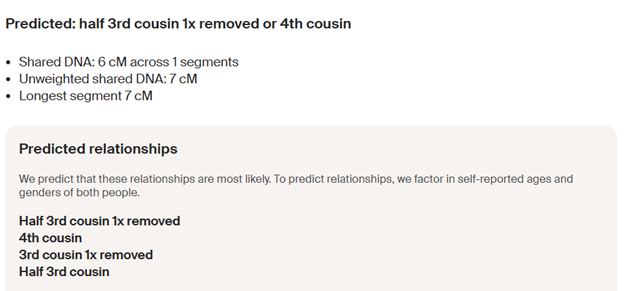
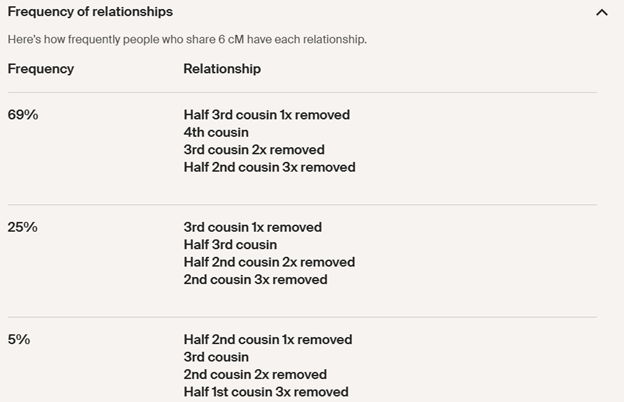
TIP7: Reminder – 2C-100%; 3C-90%; 4C-50%; 5C-15%; 6C-5% – (roughly)… This is the “curve” indicating how often true cousins will be a DNA Match to each other. ALL true 2C will be a DNA Match to each other. Of 10 true 3C, each one will usually have a DNA match with only about 9 of the others; but each of the 10 will have about 9 of the others matching – so these 10 would still form a pretty strong Cluster… Among a group of 4C, each one will only match about half of the total; and they may not all form one, strong/compact Cluster. And it gets worse, at the 5C and 6C levels… – some interconnecting cousin Matches, but not strong Clusters. However, now with Pro Tools we can find groups of strongly interconnected (closely related) Matches – strong ties to each other, but perhaps their strong subgroup is 5C to 8C with you.
At the 4C level, I see interconnected groups around the children of each grandparent couple; and sometimes a few interconnections between children. At the 5C level, as expected, I’m seeing groups (Clusters) form on the grandchildren.
Additonal TIPS
TIP8: multiple marriages; non-marriages: IF you and a Match only share DNA through one Ancestor, then your relationship is “Half”. Pro Tools often includes cMs for Half relationships, but these only apply with when you share only one Common Ancestor.
TIP9: Some Matches may be related to you multiple ways – give them a separate row (and Ahnentafel #) for each relationship. NB: If you are 3C on A16 and on A18 the odds are equal – with one segment, it could be either; with multiple segments, it could be both… However, if you are 3C on A16 and 4C on A38, with one segment, the odds are 4 to 1 that the DNA came from A16; and if you are 3C on A16 and 5C on A76, the odds are 16 to 1 that the DNA came from A16. This is because *shared DNA* is divided by 4 with each generation, on average. If you have shared DNA with a Match, it’s much more likely to be from the closest relationship.
Please post in the comments if you have good TIPs that would help us all.
Happy New Year!
[I fixed the error in Tip 7, and reposted]
[22DB] Segment-ology: Pro Tools Part 20a – A Plan and some TIPS by Jim Bartlett 20250101

 segment-ology