Unknown's avatar

About Jim Bartlett

I've been a genealogist since 1974; and started my first Y-DNA surname project in 2002. Autosomal DNA is a powerful tool, and I encourage all genealogists to take a DNA test.

Pro Tools Part 12

Featured

The jokes on me… heads up!

In my last post I noted that the Pro Tools cM relatedness was pretty accurate! Today I found two Matches who were 1C – their parents were brothers. But the SMOM said 1,637cM they had to be half siblings. I checked with DNAPainter – 1,637cM is 100% half siblings (for same generation relationship). Back to the drawing board… Did the two brother marry (or have children with) the same wife? Maybe one brother died, and the other married the widow… Nope. Checking some more – the two brothers married two sisters! They were double 1C! Not in the DNA Painter range of options, but spot on for twice the 1C cMs. All is OK, but it had me scratching my head for a few minutes.

[22CT] Segment-ology: Pro Tools Part 12 – The Jokes on Me by Jim Bartlett 20241028

Pro Tools Part 11

Featured

Ways to analyze Shared Matches Of Matches (SMOM) cMs.

Pro Tools gives us a LOT of new information. Not quite segment Triangulation, but very powerful data.

For example a Match shares 8cM with me and does not have a Tree. However, a SMOM shares 3,489cM with the Match, and Ancestry (with insider info) says the SMOM is the mother of the Match; and shares 17cM with me. As it turns out, I know the SMOM is a 3C1R with me on a particular Ancestor couple. It’s easy to 1. add the Match to my Tree; 2 add the Match to my Common Ancestor Spreadsheet; and 3. add a synopsis of this info (as a 3C2R) to the Match’s Notes. Of course this doesn’t happen every time, but it does happen some of the time.

The above example is a parent/child relationship, and Ancestry usually knows if it’s a son or daughter and a mother or father. Ancestry usually knows niece/nephew and aunt/uncle.

But the thrust of this blog post is about a family group and their interrelationships.  I’ve tried several methods to document and analyze new Match/SMOM cMs. All methods utilize my Common Ancestor Spreadsheet which is arranged by family groups [I sort by Ahnentafel of the Common Ancestor; and the birth years of children, grandchildren and great grandchildren.] This CA spreadsheet is my foundation of “known” cousins – I’m looking at their Shared Matches to see if I can determine how we are related and add them to the spreadsheet; and checking to see that the existing cousins are interrelated to each other as expected.

First try was to add about 10 blank columns to the spreadsheet. I’d then type an asterisk [*] for a Match in a column, and enter the shared cMs with the other Matches in the spreadsheet in the same column. It was sort of like a Cluster matrix; and anyone who had a faulty genealogy was easily highlighted. But two issues: 1. It was a lot of work for a family group; 2. some of the Matches were in fact related up or down a generation [not physically close on the spreadsheet]; and 3. it was difficult (for me, anyway) to determine how an unknown Match would fit in… [someday I’ll try DNA Painter or BanyanDNA…]

The second try was just one new column, and I would type in the highest cM found among all the Shared Matches; the suggested relationship [almost always accurate for high cMs];  the Match name; and any known info. Issues: again, a lot of work; and some Matches don’t have any high cM SMOM with me.  I still add these when they are the only evidence I have for adding a new Match to my Common Ancestor spreadsheet.

Third/current try involves about 3 new columns and I color in a column where Matches match most of the others. Sort of like LEEDs column-coloring. This is somewhat easier to do, without a lot of typing. And the colored “stripes” are comforting to see (and to highlight Matches who may not “belong” and/or need further research.)

Also, I’m hopping around some these days, working on specific issues (Brick Walls, questionable genealogy, trying to link in (or out) selected Matches). It appears that the closer generations have one stripy column and as I work on more distant Ancestors, the number of colored columns grows.

I’m still fiddling with good/efficient ways to use/display SMOM cMs; or even if I need to at all. I’ve worked on about 10% of my Matches in the Common Ancestor Spreadsheet. At every turn, Pro Tools is helping me find more and more Matches for whom I can determine our relationship. So still a long way to go – and I’m sure there are many more Matches to add to my spreadsheet.

You are encouraged to post in the comments any insights, tricks or hacks you’ve developed for using SMOM cMs…

[22CS] Segment-ology: Pro Tools 11 – Ways to Analyze SMOM cMs by Jim Bartlett 20241027

Pro Tools Part 10

Featured

Branch Groups

I’m methodically working my way through my Ancestors and Matches using Pro Tools. My main tool is my Common Ancestor Spreadsheet, which is now growing very rapidly. I’m not really in it for the bulk, but for the advantages of Branch Groups. What I call Branch Groups are groups of my DNA Matches under one child or grandchild of one of my Ancestors – these Matches are on the same Tree “branch”.  Such Matches are closer to each other (than to me) and tend to share more DNA with each other. They stand out with DNA shares over 90cM; and I take notice. I can often “fit” them into a Branch Group. On the other hand, I’ve found some Matches that have the right genealogy for a Branch Group, but they don’t share much DNA with others in the Group – more on this below.

Here are some thoughts and observations:

SMOM – Shared Matches of Matches aka “Rabbit Holes” – haha.  When you select a Match and click on the Shared Matches button – you get a list of all the Matches you both have in your respective Match lists. These are your Shared Matches (SMs) with that Match. Each of these SMs shares some DNA with you that you both got from the same Common Ancestor (CA). And, with Pro Tools, you know how much DNA each of these SMs also shares with the “base” Match that *they* got from some CA. Often these two CAs are the same (or one is ancestral to the other); but sometimes the CAs are completely different – *their* CA could be unrelated to you or related to you on a  different line – see Outliers below). When we’ve done our homework and entered Notes for many Matches, we can usually look down the SM list and easily see if there is a consensus, or not – see Birds of a Feather below. Like with auto-Clustering, a consensus indicates a group of Matches that mostly match each other, indicating a Common Ancestor among them. Usually, their CA is also one of your Ancestors – BINGO! This is a Branch Group.  Sometimes their CA is unknown to you – this could be a random happenstance. Or it could be a Floating Branch Group – see below.

Branch Group aka Cluster. When you find SMOMs who share high levels of shared DNA (cMs) with each other they usually form a Branch Group. By “high levels” I mean at least 90cM; but I often drop down to around 50cM as the group grows larger. I consider 20-25cM as “in the noise”, and usually not worth the trip down a rabbit hole. [For your own situation, experiment to find a threshold that usually gives you efficient results.] Sometimes you can get 5-10 (or more) of these SMOMs which link under a child or grandchild or Great grandchild of one of your Ancestors. And then it’s easier to find other SMOMs that fit into the Branch Group. Use an SMOM in a Branch Group to make a new Shared Match list, invariably with new SMOMs… the clues (or rabbit holes) are everywhere! As it turns out in a Branch Group, not all Match descendants will Match all of the other Matches in the group. Remember: at the 4C level, roughly 50% of true 4C won’t show up as matches to each other.

Birds of a Feather.  On many Shared Match lists, a scan of the Notes indicates a clear consensus – most SMs have Notes indicating the same CA; and some are from the same line (up or down a generation). These are birds of a feather – they cluster together. And Pro Tools shows them to be close relatives – these are a Branch Group. In these cases, I’m much more likely to review Matches not yet linked in, and to build their Trees back to find the link. As a quick check, click on a Match and see *their* SMs with you – are they indeed Birds of a Feather? Or not?. For some Shared Match lists, a quick scan of existing Notes may indicate they are all over the place – on both sides; on different branches – so, it’s difficult to determine a consensus. Move on…

Outliers – linked by genealogy, but not linked by shared DNA.  I’ve now run into a very few cases of DNA Matches who are clearly genealogy relatives (in my Common Ancestors spreadsheet) under Ancestor XYZ, but they do not share DNA with other close cousin Matches under XYZ. In each case, so far, they are also related to me in another way, and they do share DNA with their other cousins.  Thinking about multiple segments and/or multiple relationships leads me to Triangulated segments, but I’ll put that discussion off for a future blog post. Just be aware that a Match with one shared segment can only be genetically related one way. Pro Tools may help determine which one.

Collateral SURNAMES in Branch Groups. Less than 1% of my Matches have the same SURNAME as the CA we share [Y and mt lines are pretty rare]. This means my Common Ancestor spreadsheet (tracking the lines of descent down to Matches) includes Collateral SURNAMEs. As I’m working on an MCRA Branch Group in my spreadsheet, I’m reviewing each of my Match cousins, and reviewing all of the  SMOM shared cMs, and checking the Trees of those over 90cM (and glancing at some down to 50cM). Often there is enough to tie those Matches to my Tree (even some with no Trees). It really helps to review the Collateral SURNAMEs already recorded in my spreadsheet for that Branch – that’s usually where I’m going to find a link. And it means I don’t have to build a tree back for each Match – I can usually copy the line of descent of an existing Match in the spreadsheet, and just change the last few generations. A big time saver – in searching and typing… Recognizing a Collateral SURNAME in a Match’s scrawny Tree is helpful. Sometimes I’ll filter a long Shared Match list by a Collateral SURNAME…

Floating Branch Groups. A few times I’ve found a Branch Group that I cannot link to my Tree. They usually include parent/children, siblings, aunt/uncle/niece/nephew, and maybe some 1C or 2C, all in a tight family group. All the interrelationship cMs are on target. But, other than being on a Shared Match list with some known Matches in a Branch Group, I cannot find a link. In most cases this has happened “near” a Brick Wall (or “iffy”) Ancestor of mine. So I’ve created a Floating Branch in my Tree, so I can link other Matches to it. I need to do a study of closest known Matches to see where this Floating Branch is headed – another rabbit hole. Such a Floating Branch could just be a mirage (not really linked to me), or I might find some “tendril” Matches (maybe through a Collateral SURNAME filter) that help find the link. I operate under the belief that ALL Matches over 15cM (and many under 15cM) are true cousins, and many are within a genealogy timeframe and should fit in my Tree somewhere.   

I am now convinced of two things: A) A lot more of our under-20cM Matches are well within our genealogy timeframe than I originally thought; and B) our Brick Walls (out to at least 8C level) have plenty of Matches forming Branch Groups. With each generation going back, it’s harder and harder to figure them out, but Pro Tools can often provide new insights. This helps offset the fact that many Matches have NO Trees or very scrawny Trees. There is hope! But it takes work!

[22CR] Segment-ology: Pro Tools Part 10 Branch Groups by Jim Bartlett 20240812

Pro Tools Part 9

Featured

Build A Foundation

I feel like I’ve been drinking though a fire hose – there are just so many good clues in the Shared Match cM lists. I’ve tried all of the four Plans of Action I previously laid out – and I’ve found myself still jumping from one to another – good clues are just too hard to pass up. And a parent/child, sibling, aunt/uncle/niece/nephew and even a 1C will suck me in like a magnet – particularly when one has NO Tree and another has a good Tree. AND, if I’m working in a small sub-branch so I know many of the collateral SURNAMES and the geography,  I’ve got to capture that info before I move on…

Observation 1: As I scroll through hundreds of Shared Match lists, I see lots of Shared Matches with the same MRCA I’m researching [almost all of my over-20cM Matches have a Note indicating a validated MRCA, or a likely/imputed one]. And I see lots of Shared Matches one generation up or one generation down. For instance, I’m working on my MRCA couple 40P, and I see Shared Matches that are also 40P, and Matches who are 20P and 80P and 82P. I shouldn’t be surprised, because we are all on the same ancestral line; AND a 20P Match who is a 3C (or 3C1R) with me, is also related to my Matches on 40P – maybe as 4C or 3C1R, etc. This is very comforting to see a Match with Shared Matches up and down one of my lines.

Observation 2: Each of the MRCAs that I focus on – usually for a few days – has seen a significant increase in the number of Matches that I can verify exactly how we are related. Plus, if they are closely related to a known Match AND have a bunch of Shared Matches with me along this same line, I can add them to my Common Ancestor Spreadsheet anyway, with confidence they are on the same sub-branch.  In any case, I’m winding up with a lot of Matches under each MRCA; and a lot of new Notes for them.

Recommendation/Tip: Combining 1 and 2 above, I now think the best path forward is to build the foundations and then work back in our Ancestry.  I have no 1C, so this means starting with my great grandparent MRCA couples and, using Pro Tools, teasing out as many Matches as possible for each one of my 4 MRCA couples [8P, 10P, 12M, 14M] – and adding their info into the Match Notes. Then, as I move to the next generation further back, I will see many of these Notes in the Shared Match lists for Match-cousins back to MRCAs16P to 30M. In general, the Shared Matches to these MRCAs will “stay in their lane,” and that is a strong indication. Remember, some Shared Matches may match you one way and match the base Match another way – those Matches will usually have a shorter, random list of Shared Matches – I skip over those quickly and move on.

Bottom Line: If we start with our closest MRCA couples and “Note” all the Matches we can, we’ve built a strong foundation for when we get to the next generation. This will become more and more valuable as we work out through more distant generations. I think such a foundation will be essential when we get to 4C and beyond.

[22CQ] Segmentology: Pro Tools Part 9 Build A Foundation; by Jim Bartlett 20240724

Pro Tools 8

Featured

Group Process

Here is (sorta) my process for working with a Match and their Shared Match list with me.

1. Pick a Match with an MRCA (I don’t have good criteria yet, but I like one with a good Tree; and it’s helpful to know that they have several close cousins in my Common Ancestor spreadsheet).

2. First pass: look though all of their Shared Matches for Notes that indicate they share the same MRCA.  [sometimes I note the shared cM in a new column; sometimes I just use a highlight color in a column – in either case to indicate a group with the Match in #1]

3. I’ll stop at any Match who is very close – parent/child; sibling; even aunt/uncle/niece/nephew. If not in my spreadsheet, I add them in and add appropriate Notes to their profile to highlight the MRCA and relationship to me – e.g. #A0038P/4C1R: ALLEN/Elizabeth.

4. Then I make another pass through the Shared Match list – opening the Matches who share above 90cM (generally within about 2C to the original Match in #1 above).  From my spreadsheet I know of other SURNAMES the other Matches have in their path back to the MRCA – so I’m looking for those surnames in addition to the MRCA surnames. For example: MOESZINGER led me to 4 other new Matches from my ALLEN MRCA.

5. Repeat #4 (a third pass) looking at above 50cM or so – digging a little more (and by this time, I usually have additional Matches with helpful Notes to play off of.

6. Now, start at the top of the #1 Shared Match list (a fourth pass), and open each Match who does share the MRCA with you. Look down each such Match’s Shared Match list with you, using the #4 process above. The idea here is that not every cousin will share with every other cousin (remember only 50% of all your true 4C will share DNA with you; 50% will not!). So using this step usually adds a few more Matches to the group. [If you use a highlight color column, all of the Matches in a part of a Common Ancestor spreadsheet should get colored in.]

7. If you’re working on a Brick Wall (or NPE or bio-Ancestor, etc), go through the remaining Matches who have Trees and jot down the SURNAME in their Trees. Look for a Common Ancestor among those (usually more distant) Matches, who would be a good potential for an Ancestor at or beyond the Brick Wall.

In each case above, I add new Matches to my Common Ancestor Spread Sheet (now about 7,000 from Ancestry), and add them (and their path) to my Ancestry Tree (they are always living and private).  

Sidebar: My Common Ancestor spreadsheet is a good tool for each family group based on an MRCA. I haven’t found a good way, yet, to analyze the Shared Matches who are related to me through the children or ancestors of the MRCA. However, I do note that they show up in the Shared Match list. For instance, I’m now working on my MRCA – 38P (this is the Ahnentafel representing Joseph ALLEN, along with his wife Elizabeth [39P on her own] – maiden name unknown). It’s comforting to note that many of the Shared Matches have Notes starting with #A0018P (an MRCA representing my Ancestor who married A19P, the daughter of 38P) and some close Matches with #A0008P), an even closer descendant of 38P. Normally, I would have some smaller cM Matches back to 76P and 78P (representing the two MRCA couples who are ancestors of 38P and 39P, but both 38P and 39P are brick walls…  So Group Process #7 above, is next on my list.  

The above is a classic example of the iterative nature of genetic genealogy, and the importance of having a good Note system that lets you see the key elements in a Shared Match list. It all comes back to doing the homework of keeping good, visible, Notes at Ancestry. Tip: I now add a Match’s SURNAMEs to the Notes if I don’t have any other clues – I can then see these SURNAMEs in the Notes fields in a Shared Match list…

Bottom Line: I think the Pro Tools Shared cM feature needs an iterative process of reviewing Shared Matches to add in as many new Matches as possible under our MRCA groups. This also includes noting Shared Matches closer and more distant to each MRCA group; and analyzing remaining (usually smaller cM) Matches to break through more distant Brick Walls. Lot’s to do….

[22CP] Segment-ology: Pro Tools Part 8 Group Process; by Jim Bartlett 20240719

Pro Tools Part 7

Featured

What Is Your Plan of Action?

The Pro Tools feature that lets us see the amount of DNA (in cMs) between our Shared Matches is a significant tool. It allows us to “stitch together” families, to include Matches with skimpy, or even no, Trees. This could potentially impact all my 96,000+ Matches. That’s a lot of ground to cover…

So what’s the game plan – how do we most efficiently use this new cM data? What is the Plan of Action (POA)?

I see four different POAs – and I’m seeking your input on any insights you’ve found so far.

1. Work down our Match list. Start at the top, and methodically work on each Match that we haven’t placed in our Tree. The advantage here is that the top Matches (most shared cM) are usually the easiest to figure out. With Pro Tools we can see their top Matches, potentially ones with good Trees, and often tease out their place in our Tree. At the least, even if we cannot find the exact relationship, we can figure out which sub-branch of our Tree they are on (which is all we really need to know for them to be helpful forming a tight group).

2. Confirm each MRCA couple group. I’ve been working on this method for a while, using my Common Ancestor Spreadsheet. The focus is on all the Matches who have the same MRCA couple – does each one share an appropriate amount of cMs with the others. I must take care when some Matches have multiple relationships with me (colonial Virginia ancestry) and/or multiple segments – these could throw off a one-to-one analysis. But the main point here is: does each Match “fit”? I’ve found 2 so far (out of hundreds), who really don’t “fit” within all the shared cMs – indicating incorrect genealogy or an NPE. Bottom line: it is very comforting to see a large list of Matches under an MRCA that all “fit” each other (well within the Shared cM Project ranges). Each such MRCA couple at one generation, then is a strong foundation when working on the next generation – many Matches will be related to each other across two (or more) generations. More “comfort”…

3. Focus on specific problems.  Work on an unknown bio-Ancestor/NPE/Brick Wall. Build an appropriate group, and then re-review the Shared Match list for highest-cM Matches that may be helpful – and then look at their Shared Matches for more clues. This POA may foster a lot of “rabbit holes” and “blind alleys”. But the main point here is: build a group of interlocking Matches – they will often lead to insights.

4. Hit-n-Miss. Have fun chasing random leads. These sometimes result in a floating branch of your Tree. I have two of these – many Matches which apparently form a large (several hundred) list of Matches from one person – probably an Ancestor of mine, but no known paper trail link. Pro Tools will confirm, or not, if this is an “interlocking” group. If so, then I will look for Matches in that huge group, who have shared Matches with some other, known, MRCA group(s) of mine – hopefully there will be a strong consensus – there should be…

[Side bar: early in my Navy career (1971), I needed a system to track a lot of projects (before PCs) – we had a table of milestones. I called it: the Hectic Input and Tabulation of Numerous Milestones in our Sacred System (HITNMISS) – my boss was not impressed; so I changed the name to the Simplified Work Input and Follow Through (SWIFT) – I got promoted:>j]

I think the unifying theme above is to form interlocking Matches into a family group based on shared cM – it’s right up our alley as genealogists. And each such group is a very valuable foundation, with important links in different generations (up and down our Tree).

Are you using any of the above POAs? Have you developed a different POA that you’ve found to be particularly effective and efficient, or not? What’s the best way to incorporate all this new data? Please share.

[22CO] Segment-ology: Pro Tools Part 7 What Is Your Plan of Action; by Jim Bartlett 20240717

Pro Tools Part 6

Featured

Watch Out…

BLUF: Do not rely strongly on Ancestry’s suggested relationships – I find the true relationship is rarely the top one in Ancestry’s long list of possibilities; and it’s usually down their list somewhat. The cMs with my Matches are always within the ranges in the Shared cM Project and at DNA Painter. But, again, they are rarely at the average.

I’m reviewing all my Matches at the 3C level: 79 Matches with A16 MRCA couple; 92 with A18; 43 with A20, so far. None have been found to be outside the range of inter-relationships (perhaps 50% sampling). All are inside the appropriate ranges. BUT, two siblings may show vastly different values – one somewhat higher and one somewhat lower than the average.  My engineer brain wants two siblings to have very close cMs, but the data is truly random (within the ranges of the Shared cM Project.

Bottom line: be careful, and don’t try to force a fit. Expect the values to be in the range for the relationship; but accept that they may be all over that range. And looking at it the other way, starting with a shared cM value, the relationship [of a Match without a Tree] will NOT necessarily (or even probably) be in a small set of Ancestry suggestions (although almost always on their long list – in the “Tree” view of a Match profile).

[22CN] Segment-ology: Pro Tools Part 6 Watch Out; by Jim Bartlett 20240711

Pro Tools Part 5

Featured

Small Segments At Work

I have Match A at 25cM with no Tree; but a nephew at 1773cM, Match B who has a Tree. Match B is a 3C3R on my Ancestor 16P.  Analysis of the 1950 census and his grandmother’s obit, gave me the same name as Match A and a place in my Tree. Match B is 9cM to me. Match B has another uncle at 1771cM, Match C. Match C is also listed by name in the grandmother’s obit. Match C is 8cM with me.  And, sure enough Match A and Match C share 2315cM [siblings] with each other [corrected 7/9/2024].

This is about as solid as it gets. Clearly the 9cM Match B and the 8cM Match C are true cousins to me, per genealogy. Each of these Matches share one DNA segment with me. Although this data doesn’t “prove” these 3 segments are the same and linked back to our MRCA 16P, I’d be willing to wager that an upload to GEDmatch would show these segments would Triangulate; and match many other segments from MRCA 16P.  In a genealogy sense it doesn’t matter: these Matches belong in my Tree – with or without a DNA link.

I find this example compelling. The old saw: when you hear hoofbeats, think horses. Yes, zebras are a possibility, but the odds in the USA are way in favor of horses.  These individuals show up as DNA Matches to me – they share a segment of DNA with me. Some segments are small, some are large. When they come from such a tight fit in one part of my Tree, I’m inclined to believe that they are the same segment. It is “possible” that they each got a randomly different segment, or even false segments, but the logical reasoning is that they share part of the same segment from an MRCA. Why not just accept that for now? Perhaps, someday, some alternative will come up – even so, it would not change the genealogy backed up by records.

Icing on the cake – in reviewing Match C’s shared Matches, Match D (8cM to me) is 3476cM (a daughter) of Match C – another add to my Common Ancestor spreadsheet and to my Tree.

Bottom Line: ProTools is providing a lot of great bread crumbs to follow; and linking a lot of small cM Matches to my Tree. Be sure to scroll to the bottom of a ProTools Shared Match list, looking for high cM interrelationships! Don’t discard genealogy “finds”, just because they share small cMs.

[22CM] Segment-ology: ProTools Part 5 Small Segments At Work; by Jim Bartlett 20240707

Pro Tools Part 4

Featured

The Spreadsheet

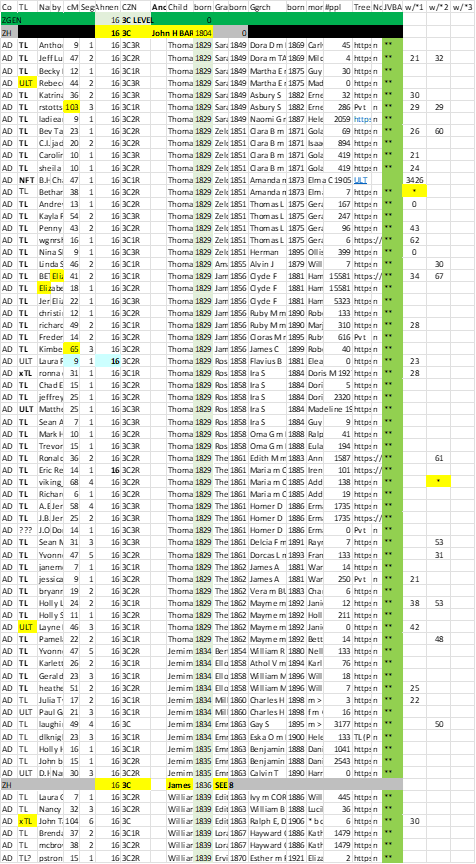
By popular request, below is a section of my Common Ancestor Spreadsheet. Shown are most of the essential columns, In order to fit the space I have in this blog, I’ve deleted a number of columns that I use to record, emails, TGs, Notes, Y or mtDNA possibilities, etc. – they are not pertinent to point of this post. On the far right are 3 columns for cMs between a Match and the *Match for that column.

Common Ancestor Spreadsheet with columns for Shared cM between Matches

Note this part of the spreadsheet is for DNA cousins on my Ancestor John H BARTLETT b 1804 (married to Sarah FLEMING). For each Match, I have their Name, any Admin, cM (with me), # segs, Ahnentafel of MRCA couple (all are 16 in this section), Cousinship; and then the given name and birth year of the child of the MRCA through which they descend; same for grandchild; and Great grandchild; and then a column for more descendants if desired (all in one cell – and I usually run this out – down to the Match). The ** in green means that Match (and the path) is in my Tree. The next columns are for entering an * for a Key *Match and the amount of shared cM between the other Matches and that *Match.   You’ll note near the bottom of the spreadsheet, child James b 1836 is listed – he is the child that I descend from (and cousin on him would be under Ahnentafel 8). Hundreds of other MRCA couples, thousands of Match cousin, are in other sections – all sorted by Ahnentafel # and birth year columns.

To do a perfect matrix, I’d need to have 67 columns to show all of the pair-wise relationships. I think I can get a pretty good picture from only one Match for grandchild. And, of course, as I find Shared cMs over about 100, I usually go down each of those rabbit holes and wind up adding most of those Matches to my spreadsheet.

 Please feel free to use as much of this format as you link, AND to add/delete/shift columns to suit your own style of research and analysis.

[22CL] Segment-ology: ProTools Part 4 The Spreadsheet; by Jim Bartlett 20240705a

Pro Tools Part 3

BLUF – The matrix which can be created by all the shared cM relationships is also showing the range of cousins who don’t Match each other.

I have now shifted to using my Common Ancestor Spreadsheet to analyze the cMs between my Matches. This spreadsheet lists about 9,000 Matches who are known cousins on specific Ancestors (a small percentage of Matches share multiple Common Ancestors with me). The backbone of this spreadsheet is a list of all my Ancestor couples out to 8C level (and some beyond), with columns for their Ahnentafel number (e.g. 16); and husband’s birth year. Under that goes a row for each Match with that Ancestor as a Common Ancestor (with the Ahnentafel number and cousinship (e.g. 3C1R) and the Match’s given names of the child and birth year the CA couple. The next two columns to the right are the Match’s Ancestor who is the grandchild of the CA, and their birth year; etc. With this setup, I can sort on Ahnentafel Number and the first birth year column and then the second birth year column and the whole spreadsheet sorts into family groups.

I am now selecting a Match and entering a * in a new column; and then, in that column, the cM of their closest Matches already in the spreadsheet. [NB: As previously reported, I’m also finding Matches who are very close relatives to the *Match (sometimes a parent or child or 1C), which causes me to go down that rabbit hole – which, in turn, frequently results in a new known cousin Match added to the spreadsheet – it’s like drinking through a fire hose.]

Anyway, as I now look down the amount of Shared cM between Matches (in a * column), I can clearly see the parents/children, siblings, aunts/uncles/nieces/nephews and close 1C and 2C in close rows of the spreadsheet. The Shared cMs get smaller and smaller up and down the spreadsheet – in fairly predictable order as the spreadsheet has different “layers” of relationships – it’s very comforting to see this pattern. Mind you, it’s not a straightforward “curve” – there is the same “jumble” that is reflected in the Shared cM Project cMs – the overlap of possible ranges among different cousinships.

The other thing that is showing up under a *Match, is that not all the 3C or 4C or 5C are showing up as Matches. This is expected. Remember the rough estimates that true 3C only match 90% of the time; and 4C only match about 50% of the time; etc.  I would need to have 9,000 columns, to perform a full analysis, and that probably isn’t in the cards. Perhaps one of the 3rd party programmers can come up with a automated program to do this… 

Bottom line: for now, it appears the concept of “true cousins don’t always match each other” is alive and well in the Shared cM data…

[22CL] Segment-ology: ProTools Part 3 TIDBIT; by Jim Bartlett 20240705