Unknown's avatar

About Jim Bartlett

I've been a genealogist since 1974; and started my first Y-DNA surname project in 2002. Autosomal DNA is a powerful tool, and I encourage all genealogists to take a DNA test.

D I Y Clustering

A Segment-ology TIDBIT

Automated Match Clustering involves large spreadsheets; selecting max and min thresholds; downloading data; using third-party tools; and then analyzing the clusters. Is there a different way to Cluster AncestryDNA Matches? I think there is… Do-It-Yourself Clustering.

I think we can select a Match and then look at our Shared Matches and then, often, see a trend or pattern among them. If we’ve used the Note boxes liberally (see below), we might see known Common Ancestors (CA) among the Shared Matches and/or a known Triangulated Group (TG) among them. Note that we sometimes know one of these Building Blocks (CA, TG) without knowing the other – that’s OK, they are both important clues that are “pointers” to a Cluster.

So…  in the Notes for each AncestryDNA Match, we select some notation to indicate what this trend or pattern is. This notation would be the tentative “Cluster ID”. We could use a Surname [PLUNKETT]; or a Couple [PLUNKETT/HAM]; or the Ahnentafel for this couple [104/105] (or just the shorthand version: 104 – see a CA ID method here). Or, for Matches who have uploaded elsewhere, and we know the DNA segment(s), we could use that data (see one method, the TG ID, here). Feel free to use whatever system works for you to identify which Cluster you feel pretty sure about for this Match. If it’s not clear, just skip this Match and come back later (we’d do this a lot for Matches with Private or No or skimpy Trees). Note: I believe each Cluster is based on an Ancestral line. Clusters around a closer CA will probably have multiple TGs; a more distant CA will tend to have one TG.

A real aid in this process is MEDBetterDNA. It’s a Chrome extension, so you must use the Chrome browser (free). It has several features but the critical one here is that you’ll see all your Match Notes all the time (no need to click on the little “page” icon). Google MEDBetterDNA and use checkbox: “always show Notes”. It REALLY helps in looking down a long list of Shared Matches. [BTW: it would be very nice for AncestryDNA to make this standard…].

To use this process, we also need to use the Note box – we need to enter any CA or TG we find for a Match. I started with all my Hints – each one had at least one CA. And, as I looked over all my closest Matches, I found more CAs. Sometimes I found Matches at GEDmatch, which I could Triangulate and link to AncestryDNA Matches, giving me a TG in the Note box. Whatever system you’ve used to find cousins with CAs or TGs, enter what you’ve found in the Note box. Then, for all Matches over 20cM, you’ll see those Notes when they are in a Shared Match list. The homework assignment here is to enter Notes for as many of your 4th cousins (4C), or closer, as possible. Note that you’d need this same data in order to get anything out of a Match Clustering Matrix spreadsheet.

Then, starting with 4C (saving closer cousins for later), and look at each Match. See if you can tell from their Notes and the Shared Matches’ Notes what the Cluster would be. Maybe there will be multiple choices. Whatever it is, enter your Cluster ID in the beginning of the Note box. Go to the next 4C Match and repeat.  Skip any Match you want – this is an iterative process, and you may need to go through your list several times – I believe the Cluster IDs will “tighten up” – become more solid – with each iteration. At some point, even the Matches with Private/No/Skimpy Trees will have lots of Shared Matches with the same Cluster ID. Give that Match a Cluster ID, too!

After you’re satisfied with the 4C list, you can cycle back to the 3C list, and confirm that they are compatible with the trend of their Shared Matches. Each 3C may be associated with several Clusters. In fact some of your 4C Matches may have a few Clusters. This is OK – but multiple Clusters should be for adjacent ancestral lines which eventually converge (marry) at some level.

At this point, you can look at Matches beyond the 4C level. Many of my Hints with CAs are beyond 4C. Many of them will have Shared Matches (4C or Closer), and the Notes will point toward a Cluster ID. Although these distant Matches won’t show up in a Shared Match list, I’d still enter the Cluster ID in the Note box, just to keep track. You’d also need to list these separately – in a spreadsheet or on paper. However, if you put a hashtag, like #Cluster in your Notes, you can search on different Clusters. I just searched my AncestryDNA Results for #A0856 [my hashtagged CA ID] and 10 Matches popped up, including Matches with 6.3cM, 7.4cM and 13.2cM.

If I decided the above distant CA, #A0856, was a good Cluster ID, I’d enter #C0856 as the first entry in the Notes for all the Matches I thought were in that Cluster. Later, I could make a download and sort on the Note field to group all the Matches by Clusters. Or I could easily check my work against an Automated Match Clustering Program. Hopefully there wouldn’t be many differences.

The beauty – and benefit – of DIY Clustering:

  1. You can put a Match into more than one Cluster! Clustering programs have trouble with close cousins and multiple CAs/TGs – they don’t fit into just one Cluster. But what’s wrong with putting a Match into two or three Clusters if they really fit? Nothing – you are in charge with DIY Clustering.
  2. With Automated Match Clustering, you must have all your clues in place, up front. With DIY Clustering you can select which Clusters to work on first, and then get to the others later. Work at your own pace.
  3. DIY Clustering is primarily for AncestryDNA Matches, but you can also compare these Clusters with Match CAs and TGs from other companies. They should align and reinforce each other.

So, if you’d rather not use a Match Clustering program/spreadsheet, Do-It-Yourself. It involves entering Notes in a lot of Matches, but that is a good practice anyway. And the good news is you can adjust your Notes, and Cluster designations, as you go along. I actually believe we’ll get a better result with this DIY method, which we can easily tweak. I’m going to try it.


[22AD] Segment-ology: DIY Clustering TIDBIT by Jim Bartlett 20190218

Match Cluster Report 1

Here is a report on my first Match Clustering effort.

Background info:

  1. I used a download of my AncestryDNA Matches above 20cM (I only had a few real 3rd cousins (3C) and below, and I just left them in.
  2. I have made extensive use of the Notes for as many Matches as I can – all of my almost 1,000 Hints; and maybe 1/4, so far, of all my 4C and closer. NB: AncestryDNA uses 20cM as the threshold for 4C designations, but many Matches in this group are 5C and 6C and I’ve found some who are 7C and 8C, with larger than average shared segments over 20cM.
  3. For every Match I can, I put the Shorthand CA ID and/or Shorthand TG ID in the Note box for that Match. See the Explanation of Header row below for links that explain these IDs.
  4. For each Match, I also put a line in each Note which includes a summary of the CA and TG IDs found in all the Match’s Shared Matches (SM). So even a Match with a Private Tree, or No Tree, or scrawny Tree, or can’t-find-anything-in-it large Tree, will get a line summarizing their SMs. This summary often provides a very specific “pointer” to a CA and/or TG. And this added info is very helpful in analyzing Clusters.


When I ran the Cluster Matrix, I developed this summary report:

22ACa Summary of Match Cluster 1

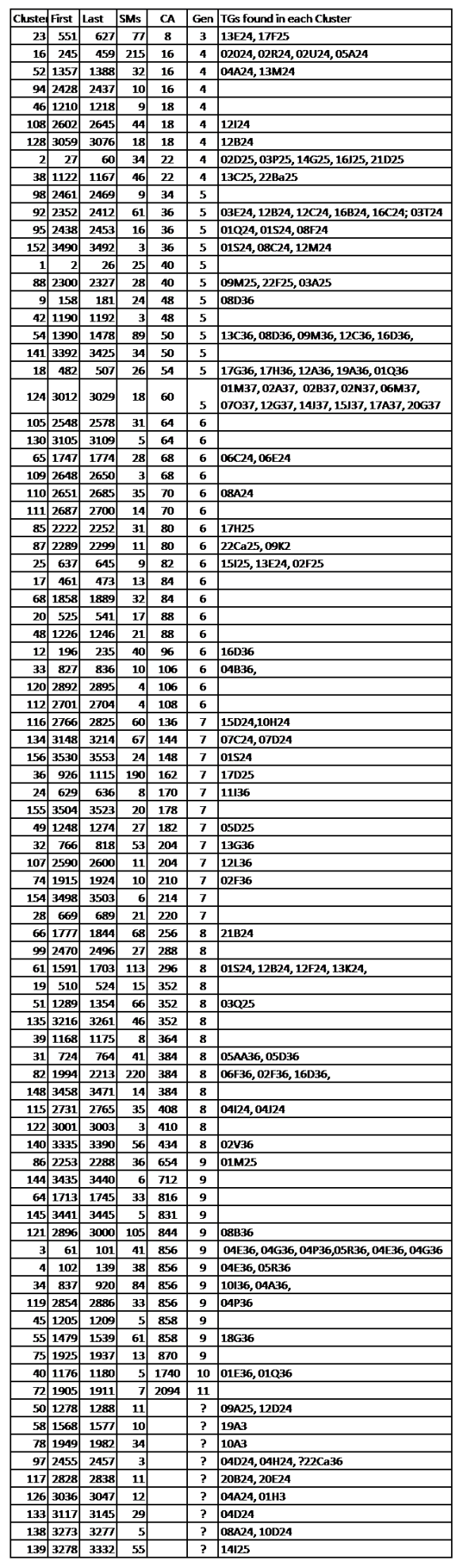
Next is a spreadsheet with the 86 Clusters, re-sorted on the CA.

Explanation of Header row:

Cluster – the Cluster # in the Cluster Spreadsheet presented to me.

First & Last – the Match # range included in this Cluster (Matches go from 1 to 3571)

SMs – the number of Shared Matches in each Cluster – a wide range…

CA – the CA ID (an Ahnentafel # – see this blogpost). When various Matches had CAs from different generations, but all on the same line, I used the most distant CA – Walking the Ancestor Back. A few Clusters had multiple CA lines, but I used CAs that Walked Back or were repeated several times.

Gen – as a convenience, I noted the generations back to the CA

TGs – the TG ID (see this blogpost). I all cases (I think) the last two numbers in each TG ID (being the TG grandparent) are in agreement with the CA ID. A number of Clusters have multiple TGs.

NB: The CAs and TGs come from my typed Notes for some Matches (I just haven’t gotten to all 3,571 of them, yet). The Notes are based on valid data – from the Match or GEDmatch (i.e. not guesses by me), but I’m fully aware that some of it is not conclusive; and another, closer and/or different, CA may be found. The TGs should not change, but often a Match will have multiple TGs, and only one would apply to the specific Cluster or CA.

Figure 1. Summary of 86 Clusters

22ACb Figure 1 Summary of 86 Clusters

A few notes on this data:

  1. I am sure that, eventually, the Clusters at the top of this table will be found to link to more distant Ancestors – I just haven’t found them yet.
  2. I am sure that, eventually, the two Clusters in Gens 10 and 11 will wind up with different, closer CAs – I just haven’t found them yet (there are relatively few Matches in each of these Clusters)
  3. For the bottom 9 Clusters, I do have TGs, so I can use Matches from other companies (already included in these TGs in my Master Spreadsheet), to find likely (or at least possible) CAs. It’s just that no CAs have been determined yet at AncestryDNA for the Matches in these Clusters.
  4. In Gen 9, CA 856 is my prolific and well documented HIGGINBOTHAM Ancestor; and I’ve Walked this Ancestor Back in at least two TGs. There are several lines from this Ancestor who intermarried.
  5. In Gen 8, Cluster 61, over 100 Matches – this was a brick wall at Gen 5, until I found several dozen Matches in Gen 6-8 with CUMMINS/CUMMINGS Ancestry, which I have subsequently researched into one Tree – also a prolific line. And a new branch of my Tree!
  6. I’m sure there will be unfolding stories about other of these Clusters – I’m excited to see the way this is trending.


[22AC] Segment-ology: Match Cluster Report 1 – by Jim Bartlett 20190214

Walking the Match Clusters Back

A Segment-ology TIDBIT

It appears to me that the next step for Clusters is “Walking the Clusters Back.”

By this I mean, start with the original Leeds Method, 2nd cousins (2C) and 3C, which tends to result in 4 Clusters – one for each grandparent. Often, particularly with known 2C and 3C, you will be able to determine the grandparent for each Cluster.

Then adjust the shared segment cM threshold to focus on 3C and 4C and try to get 8 Clusters. This may take some fine tuning in the threshold, but if you get plus or minus one or two Clusters, that’s OK – just work around it. Now if you can tell from the Matches who were in the 4 Cluster Matrix who repeat in this nominal 8 Cluster Matrix, you know which two Clusters belong to each of the 4 grandparents. Then, if you can figure out the great grandparent in one of the two Clusters for each grandparent, then the other Cluster should be for the other great grandparent.

Once you do what you can with the 8 great grandparent Clusters, adjust the cM thresholds, and rerun a Cluster Matrix to shoot for 16 Clusters and repeat the process.

This would be Walking the Clusters Back. And, in the long run, it might be more efficient and accurate that trying to start with a small cM threshold and getting a large number of Clusters – 128 to 512 Clusters. As the number of Clusters grows, more and more Matches will be conflicting; and more distant Matches may well share more than one Common Ancestor with you. It just gets more complicated to sort out at the larger Matrix levels. Walking the Clusters Back will make this process easier.

And the absolutely great news – a huge benefit of Clusters – is that Shared Matches will cluster when they are Private, or have little or no Tree, or even when they have a robust Tree, but you cannot find any Common Ancestor. In other words no genealogy, nor TGs for that matter, are required to place a Match in a Cluster. Also AncestryDNA Matches who share less that 20cM can also be manually added to a Cluster, based on their Shared Matches. This is bringing “into the fold” Matches which normally would not be grouped. And putting these Matches into Clusters at any level, really helps when it comes to building parts of their Tree out to meet yours.

Match Clusters really fine tune our data. Happy dance… [HT: Dana Leeds]


[22AB] Segment-ology: Walking the Clusters Back TIDBIT by Jim Bartlett 20190214

Confessions of a Match Clusterer

A Segment-ology TIDBIT

I’ve been explaining and discussing and arguing about Match Clusters recently. One debate concerns whether a Cluster is formed around an Ancestor (CA) or a Triangulated Group (TG). I argue that Clustering tends to result in 4 or 8 or 16 or 32 Clusters (or some other number of Ancestors in a given generation), depending on the shared segment cM threshold used. It might seem like I know the Ancestors and/or the TGs for each of my Clusters.

Confession time – I do not!

I’m working hard to determine as many as I can, but the current status is still spotty. I’m having a fairly good experience with TGs (98% of my DNA is covered by TGs); and know some CAs (over 80% of my TGs are known to the grandparent level). But I still have a long way to go on Chromosome Mapping. “Walking the Ancestors Back” on each TG is the name of that game.

I’m fairly new to Match Clustering, and as I look over that data (from my recent Cluster Matrix of AncestryDNA Matches over 20cM), I see lots of bare spots. I do see some trends, but in no way have I determined distant Ancestors (the CAs) for each of my Clusters. Nor have I determined the TGs for each of my Clusters – some Clusters have multiple TGs, and many have no TGs (after all, this Matrix is based on AncestryDNA data). It will take a while to analyze and weigh the information I’m collecting.

I’m working on a better analysis and a report of the one Cluster Matrix I’ve tried so far – stay tuned!


[22AA] Segment-ology: Confessions of a Match Clusterer TIDBIT by Jim Bartlett 20190214

Match Clusters – Chicken or Egg?

A Segment-ology TIDBIT

Are Match Clusters based on the genealogy or the DNA? Our Matches share both with us.  In other words, do Match Clusters tend to focus around a Common Ancestor (CA) with most of the Matches or on a Triangulated Group (TG) with most of the Matches? Do we have an Ancestor first (who points to TGs) or do we have a Cluster TG first (which points to a CA)?

Some have opined that a Match Cluster is the same as, or similar to, a TG. I think Match Clusters form around Ancestors, and that each of our Ancestors can be associated with only certain TGs. In other words, the Ancestors come from Clusters, and Clusters may have multiple TGs.

Let’s look at what we “see” with clustering. With the Leeds Method the focus is on the 4 grandparents. I can assure you that each of our grandparents is associated with multiple TGs. I currently have 380 TGs covering 98% of my 45 chromosomes. Let’s round that to 400 TGs. This means that each grandparent would have roughly 100 TGs (or alternatively, each of those TGs would come from a distant ancestor, down to me through the one grandparent). If we have a Clustering Matrix with 4 large clusters, each one would almost certainly be from a different grandparent and maybe 100 TGs.

When we look at various clustering results, we usually see 4 clusters, or 8 clusters or 16 clusters, etc. This is a tip off that each cluster represents an Ancestor at some generation. NB: Clustering is not as precise as Triangulation, and not every Match in a cluster will be from the same Ancestor. Some Matches will share multiple Ancestors with us – sometimes from both sides (Paternal and Maternal) of our ancestry. The Clustering process has a hard time dealing with that – and it is an imperfect system. And all of the Clusters may not be from the same generation – but most will be. However, taken as a whole, the Clustering process does a good job of grouping Matches by Ancestors. Each Cluster will represent an Ancestor, even if every Match in it does not have that particular Ancestor.

Another way to look at this is to remember that each TG comes from one specific ancestral line (from a distant ancestor down to you). But turning this around is not true – we cannot say that each Ancestor passes down one TG. Clearly each parent, grandparent, great grandparent, etc. passes down multiple TGs.

With the above in mind, let’s look at Clusters and Match thresholds. The Leeds Method uses second cousins (2C) and above. The 2C are from a Great grandparent couple and represent their child which is your grandparent. This is why the Leeds Method tends to result in 4 Clusters of Matches – one for each grandparent. The “threshold” here is about 200cM (to accommodate most 2C which average about 230cM)

If we drop the threshold to about 60cM, we’d pick up mostly 3C (average 74cM) and closer, and we’d wind up with roughly 8 main Clusters in a Matrix – one for each of eight Great grandparents.  At AncestryDNA, they use 20cM as a threshold for 4C, but we’ve experienced many actual 5C-8C in this mix. From the Shared cM Project we have the average for a 6C at 21cM, so I’m pretty sure the 20cM threshold will pick up some 7C and 8C, too.

In any case, when I ran the Genetic Affairs Match Clustering program (using a 20cM threshold download from DNAGedcom Client), I got 3571 Matches and 158 clusters. That’s pretty close to 128 clusters, with one from each 5xG grandparent. This means to me that there were a number of 7C in the mix from 6xG grandparent couples, with a few more 8C Matches which split some of the clusters and brought the total up to 158. This seems to be a reasonable outcome as some of the clusters are only 3 Matches.

So my conclusion is that Match Clustering results in clusters around your Ancestors. And each cluster may include more than one TG. By selecting a threshold, you can roughly target the generation you want – 200cM for 4 grandparents; 60cM for 8 Great grandparents; 30cM for 16 2xG grandparents; and 20cM will get you roughly 128 5xG grandparents. It gets fuzzier with lower thresholds, because these lower thresholds can be from a range of cousinships.

The next, very important, step is to tag each cluster with the most logical CA (most from one generation). Over 230 of my AncestryDNA Matches are in known TGs (from uploads to GEDmatch or tests at other companies). In these cases some TGs might also be tagged to each cluster. This is exciting, because each Cluster can then point to a CA and selected TGs that the other Matches in the Cluster will likely have. I’ve already used the CA clues to find CAs for other Matches, and noticed that some Clusters tend to have only one or two TGs… Very important, and useful, clues!

[edited info on the Leeds Method 2/1/19]

[22Z] Segment-ology: Match Clusters – Chicken or Egg? TIDBIT (11 Feb 2019)

The Fundamental Building Blocks of Genetic Genealogy

A Segment-ology TIDBIT

In genetic genealogy, there are two fundamental building blocks: Ancestors and DNA Segments.

As genetic genealogists, virtually everything we do revolves around these two key elements. The Ancestors are really Common Ancestors (CAs) with a Match; and the DNA Segments can be grouped into Triangulated Groups (TGs). See How To Triangulate here. Each of your TGs is really a DNA segment (on one of your Chromosomes) that came from an Ancestor.

In Segmentology, the Two Fundamental Building Blocks are:

  1. Common Ancestors (CAs) – see my Shorthand ID for a CA here.
  2. Triangulated Groups (TGs) – see my Shorthand ID for a TG here.

These two fundamental building blocks, and their shorthand IDs, are valuable tools. Here are some examples:

Reasonable. Suppose I have a cousin/Match: 36P/4C on 01S24, with a 38.7cM shared segment. This looks reasonable. CA 36P has an ancestral line down to me as: 36-18-9-4-2-1, so it agrees with the 2-4 in 01S24 and both are on the P-side. And 38.7cM is in the range for a 4C.

Unreasonable. Suppose I have a Match on TG 01S24, with a 38.7cM shared segment, and then find a Common Ancestor 856M – I quickly know there are issues. 856M is a Maternal Ancestor and 01S24 is a Paternal TG. Also if the Match shares 38.7cM, the CA is not likely to be as far out as CA 856 [8th cousin range].

Impossible. Similarly, suppose I have determined a 256P CA with a Match, [paternal side]. The Match subsequently uploads to GEDmatch, and I find that our shared DNA segment is in TG 08B36 [maternal side]. We may still be a genealogy cousin on our CA 256P, but we have another CA on my maternal side who is linked to 08B36. Side note: this actually happened to me when I started with autosomal DNA. I worked hard to find CAs with 100 Matches before I really understood how to use the DNA. Later I determined that 25 of these CAs were impossible for the DNA segments which the Matches and I shared. 25% of the CAs were not linked to the DNA. Every time I find a CA without segment information, I think about this 25% error rate…

Very helpful. These two fundamental building blocks, and their shorthand IDs, are very valuable in analyzing various CAs we may find in a TG; or in reviewing a list of InCommonWith or Shared Matches, or Match Clusters. It takes some work to type them into the Notes boxes (at AncestryDNA, MyHeritage, FTDNA), but they sure are handy and helpful with analysis of groups. I’ll blog more about how to use these building blocks.

IMPORTANT BOTTOM LINES

  1. Finding CAs is genealogy work! We have to do this work – by reviewing a Match’s posted information or by contacting them (and sometimes by building their Trees).
  2. Forming TGs is a mechanical process – also work! I recommend trying to get as many shared DNA segments as you can into the appropriate TGs. Grouping your segments into TGs will save you time in the long run. See The Benefits of Triangulation here.
  3. Your TGs and CAs have certain specific links. Each TG will be linked to a specific ancestral line – often including several CAs at different generations with different cousin/Matches (aka Walking the Ancestor Back). Each CA will be linked to only certain TGs. Distant CAs may have only one TG; Intermediate CAs may have a few TGs and Close CAs will be linked to several TGs. See Figure 3 in this blogpost for an idea of how many segments (TGs) ancestors at different generations are likely to have. The point is that each of your Ancestors will link to only certain TGs, or none.


[22Y] Segment-ology: The Fundamental Building Blocks of Genetic Genealogy by Jim Bartlett 20190203

Standard ID for Triangulated Groups

A Segment-ology TIDBIT

In my spreadsheets and notes and analyses, I refer to Triangulated Groups (TGs) by a special ID name for each one.  For example: TG 01S24 breaks down as follows:

01 means Chromosome 01 – this TG is on that Chromosome

S indicates, roughly, how far out on that Chromosome the TG starts. Each letter is roughly 10Mbp wide. “A” means the TG starts between base pair 1 and base pair 10,000,000 (or 10Mbp); “B” means the TG starts between 10 and 20Mbp; “S” means the TG starts between 180 and 190Mbp. In fact, my TG 01S24 covers 182-229Mbp; and the next TG along Chromosome 01 is 01X24. I’m not a slave to this “rule,” and adjust where it makes sense. NB: Everyone will have a uniquely different chromosome map, and their TGs will have different locations.

24 indicates the grandparent in Ahnentafel. When I can determine a TG is on my Paternal or Maternal side, I use 2 or 3 respectively. When I can determine the TG is on a particular grandparent, I use 24, 25, 36 or 37. I only carry it out two generations (so far). NB: some people use P or M (for Paternal or Maternal), instead of Ahentafel numbers – take your pick.

If I’m referencing a Match, I might add the cM to show how significant the Match is in the TG. For example, Match A with 01S24, 38.7cM is much more significant than Match B with 01S24, 9.3cM. Clearly Match A is more likely to be a closer cousin (maybe a 4th or 5th cousin) than Match B (maybe well beyond my genealogy Tree)

BOTTOM LINE

Give each TG an ID

01S24 = A TG on Chromosome 01; starts 180-190Mbp; mapped to father’s father’s line

01S24, 38.7cM = A Match segment in TG 01S24 which is 38.7cM.


[22X] Segment-ology: Shorthand ID for Triangulated Groups TIDBIT; by Jim Bartlett 20190202

Shorthand ID for Common Ancestors

A Segment-ology TIDBIT

In my spreadsheets, Notes and analyses, I refer to Common Ancestors (CAs), or Most Recent Common Ancestors (MRCAs), by their Ahnentafel numbers.

Most of the time the MRCA with a Match is a couple, and I use the Ahnentafel number of the husband. For example: 36P is my father’s father’s mother’s father’s father (or 1-2-4-9-18-36 with the Anentafel number for each generation). This 36P shorthand actually refers to the 36/37 couple (Thomas NEWLON and wife Susan in my case). I add on a P or M to indicate the Paternal or Maternal side, as this is not obvious with larger Ahnentafel numbers after several generations.

Just to keep my bearings, I also usually indicate the cousinship of a Match – for example: 4C (4th cousin) or 4C1R (4th cousin once removed), or 3Cx2 (double 3rd cousin), or 2C/2 (half 2nd cousin). So the shorthand ID is usually something like 36P/4C1R – a lot of information packed into a compact ID. And, given this shorthand ID, I can always repeatedly divide the Ahnentafel number by two to get back down to me. For example: 856M breaks down to 428-214-107-53-26-13-6-3-1 (me); which is on my mother’s father’s side. I can easily tell that other Matches with 214M and 53M and 13M MRCAs are all on this same ancestral line.

BOTTOM LINE

Use a Shorthand ID for CAs and MRCAs

36P/4C1R = the CA is Ahnentafel 36, Paternal side; the Match is a 4th cousin once removed


[22W] Segment-ology: Shorthand ID for Common Ancestors TIDBIT by Jim Bartlett 20190202

Icicles – Part 2 and Match Clustering

Let me start by saying this Icicle methodology, here, has not been as useful or accurate as I thought it might be. I don’t want to steer the readers of this blog in the wrong direction.

I’ve used this Icicle method and expanded the number of my columns of icicles a lot. Some of them turn out to be very helpful, with many Matches from the same Ancestral line and/or from the same Triangulated Group (TG). However, many are not so helpful. After all, these Icicles are just In Common With (ICW) lists. ICW lists are found at AncestryDNA (called Shared Matches); at FamilyTreeDNA (called In Common With); at 23andMe (called Shared Relatives); at MyHeritage (called Shared DNA Matches); and at GEDmatch (called People who match both kits).

Just a reminder: to get an ICW list, the program starts with a list of all your Matches (at that company) and compares your list with a list of all the Matches of a “base” Match (which you select) – the ICW list is a list of all Matches which are on both lists. In other words, the comparison is based on Match names, or kit IDs, and nothing more than that. In general, you and your selected base Match will have a shared DNA segment and a Common Ancestor (CA). Your ICW Matches may, or may not, share the same DNA segment and/or the same ancestral line. This provides powerful information when there is such an alignment; but it’s just a list of data – not much help – when there isn’t an alignment.

The good news is that 23andMe and MyHeritage both tell you when there is shared DNA alignment with a Match. 23andme puts a “Yes” in their Shared Relatives list; and MyHeritage adds a Triangulation “icon” in their Shared DNA Matches list when the ICW Match aligns (or Triangulates). GEDmatch lets you compare two kits, so you can check for a shared DNA segment; and their Tier1 Triangulation tool will list the top Matches which Triangulate. Since FamilyTreeDNA also provides segment data, we can check Matches in an ICW list to see if they are on the same overlapping DNA segment that you and the base Match share. This means they are in alignment over 95% of the time; virtually 100% of the time when there are multiple (say at least 4, not closely related) Matches who meet this ICW AND same segment criteria. See also the DoubleMatchTriangulator*.

The above segment Triangulations are a much more accurate and reliable way to group (or form Clusters of) Matches. However, this process is not available through AncestryDNA (although segment Triangulation can be accomplished on AncestryDNA kits uploaded to GEDmatch). For AncestryDNA Matches a good process is clustering Matches into groups – a good way to analyze your Matches at AncestryDNA – a step up.

One method to cluster Matches at AncestryDNA is the Leeds Method* – usually used to form cluster groups at the grandparent level, although some are pushing this a generation or two farther. At those more distant levels, some amount of judgment is needed.

Another method is my Icicle method, here, but this has turned out to be a lot of work, with mixed results – sometimes a good, helpful, thread is found; often one is not easily found, or one may not exist. There is no “rule” or argument that says an ICW list must have an ancestral thread. It’s logical that one may exist, given that you and the “base” Match have a Common Ancestor, and therefore some of the ICW Matches may have a higher probability of having the same CA. One tactic is to group the Icicles by ancestral lines or TGs, by moving such Icicle columns to be adjacent to each other and noting a common thread. However, it’s probably somewhat easier to use one of the tools below.

Several new methods for automatic Clustering have come out recently. GeneticAffairs* (small fee) now has an AutoClustering tool that puts all of your Matches (above a threshold) into a matrix, noting which are ICW each other, and then grouping them into matrix “boxes”. These “boxes” have a high probability of the same Common Ancestor, because there are multiple Matches in alignment with each other. Depending on the threshold, you might get 8 or 16 or 32 matrix “boxes” – representing 1, 2, or 3xG grandparents. NodeXL* also forms AncestryDNA Match clusters. And DNAGedCom Client* (small fee) has recently added a clustering tool.

Ideally these matrix “boxes”, or clusters, will group many of your Matches under the correct ancestor. They result in high probability outcomes; however, they are not perfect. Close cousins may be from several of these ancestor clusters and thus cause some confusion in clustering. But usually we know where the close cousins go. Also some Match cousins may share multiple CAs with you.

BOTTOM LINE – The best Clustering technique is Segment Triangulation – basically guaranteeing a Common Ancestor on a specific segment, IMO. I have a total of about 380 TGs that cover all of my DNA. Segment Triangulation is available for all the companies, except AncestryDNA. For Ancestry DNA, there are several Clustering techniques, noted  above, that can be used to group Matches.

* More about these tools, and others, can be found through: https://isogg.org/wiki/Autosomal_DNA_tools


[19B] Segment-ology: Icicles – Part 2 and Match Clustering by Jim Bartlett 20190107

Think Icicles!

Analyzing our Matches at AncestryDNA through Shared Matches

With about 20 million atDNA tests taken, we now have many Matches and lots of data. This blogpost describes one method (a “hack”) to manage some of that data. In this case, I’m trying to squeeze more information from my AncestryDNA Matches. Ancestry doesn’t report shared DNA segment data, but they do have several unique features we can put to use. In preparation, we need two things: Notes, which I’ve posted on here and here; and a spreadsheet of all the Matches.

  1. Notes. When known, I’ve been entering #A (with the Ahnentafel number and surnames of our MRCA Ancestors) and #T (with the Triangulated Group ID#) into the Note box on the DNA page for each Match at AncestryDNA. I have over 1,000 Hints, so I have a #A entry in the Notes box for each Hint. For hundreds who have uploaded to GEDmatch (or used another company too) I have a #T entry in the Notes box. This data is very helpful, but not essential.
  2. Spreadsheet of Matches. I have downloaded my 83,000 AncestryDNA Matches to a spreadsheet. This spreadsheet includes the Match name, the Admin, total cMs, all my entries in the Notes boxes, a URL link to the Match, and a URL link to their Tree. This is a great tool for exploring and managing my AncestryDNA Matches. I use DNAGedCom Client for a fairly quick download (small subscription fee).

So I took my spreadsheet (which is sorted on total cM) and added about 20 columns. I then chose an interesting 4th cousin (4C) Match and clicked on Shared Matches (SM). I then put a “1” in the first blank column of my spreadsheet for this 4C Match and also for each of our SMs. Since I started down the list with a middle-of-the-pack 4C, some of our SMs are higher in the spreadsheet, and some were below the SM I started with. (I yellow-highlighted the 1 for the SM I started with – to remind me who I started with). Note that the SMs are all classified as 4C or closer by AncestryDNA, although I’ve found a number of them to be really 5C or even 6C. But that’s OK – these “4C” Matches result in a manageable group of Matches – about 3,000 out of the total of 83,000. So I was working with the top 3 percent of my Matches – all sharing at least 20cM with me. This process resulted in a column with 1’s in it, generally spread out over all of the top 3,000 Matches.

Next, pick another interesting 4C (your choice – I picked one I knew was a real 4C on a pair of 3xG grandparents I’ve done a lot of work on and with whom I have several established Triangulated Groups (TGs) from the other companies. I went to the next column and entered a 2 and yellow-highlighted that 2. I then ran Shared Matches on that Match, and put a 2 in the same column for each one of the SMs – again, some were closer cousins, higher in my spreadsheet, and some were lower, getting down to the end of the 4C SMs.  Again, another column with all the same number. I made a blank row at the top of my spreadsheet with the numbers 1 to 20 in that row, and then froze that row, so I could see it as I scrolled down.

I chose more 4C Matches which did not yet have a number, gave them a yellow-highlighted number, ran the Shared Match for each and repeated the process.

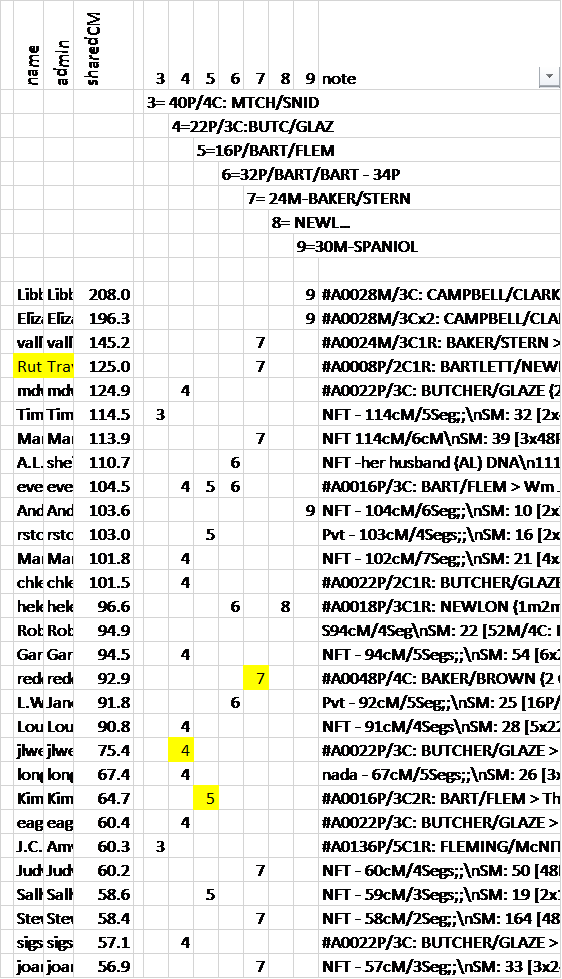
Figure 1. Portion of Spreadsheet showing headers, columns Notes and icicles.

Down the spreadsheet, these numbers began to look like icicles hanging down. Nearer the top portion of the spreadsheet, some of the Matches had several numbers, and very near the top some of the Matches had many numbers. Think about this! We are actually looking at an upside down Tree – the trunk at the top and the various large branches (multiple numbers) hanging down, gradually separating into individual branches representing individual ancestors at the 4C or 5C or 6C level. This is as it should be! If we keep going we should find 16 couples at the 4C (or 3xG grandparent) level. Some more will be there because we are actually dealing with some 5C and 6C in the AncestryDNA “4C” category.

Time out for reflection on this process. This methodology is not as finite or rigorous as forming a Triangulated Group – which TG has only one basic solution. TGs are based on segments. These icicles are based on genealogy relationships. The SMs actually have In Common With relationships, and some of them don’t share the same Common Ancestors with you and the base Match. The SMs may relate in different ways, and thus not really all be on the same ancestral line. This often shows up in the spreadsheet when a 4C Match down the list winds up with numbers from more than one icicle. Often, in the Notes for that Match, it’s possible to determine which ancestral line (icicle) they belong. In this case I color their other icicle number red (for wrong icicle).

Another way to tell which ancestral line icicle is correct is to take a 4C Match (down the spreadsheet with multiple icicle numbers), and set them as the base, and run the Shared Match list. Usually it will be very clear that their SMs are on one icicle and not on the other icicle(s), maybe with one or two exceptions due to endogamy.  If it really looks like that Match is creating an ambiguous mess, highlight that Match row in red and focus on the more “well behaved” Matches.

Remember, this is just a process and tool for you to use. You are in charge. Don’t become disoriented by a few Matches. Look at the big picture, and come back later – maybe much later, when the “dust has settled” and see if you can rationalize those few Matches.

Another thing to watch for is basically duplicate icicles. This happens when you pick a new 4C Match as the base, and the SMs wind up being almost exactly the same as a previous icicle. In this case merge the two columns. In any case use your judgment – if you want to keep the two, slightly different, icicles, OK; if you want to merge them, OK. At the end of the day it won’t make much difference.

At some point, after you have created many different icicles, it’s time to check your Notes (with MRCA and/or TG info in them) see if you can determine an ancestral thread running through the icicle.  At the top of my spreadsheet, I inserted about 20 rows (one for each icicle column) and added the numbers in a diagonal fashion – like a matrix – with each number in its respective column and on a separate row. After each of these numbers I added a description that I felt best described the icicle – usually an Ahnentafel number with the surnames of the MRCA couple; or the TG ID# if that seemed to be the theme of the icicle – there being no consensus on the MRCA yet.

I am now in the process of rearranging the icicle columns based on information from the 2C and 3C Matches. Done correctly, this will wind up with all the paternal icicles on one side and the maternal icicles on the other side of the 20 columns I started with; and within those two sides will be the split between the grandparents (an objective of the Leeds process which has a similar methodology). Theoretically, by using 4Cs, we should be able to sort out the 16 MRCA couples with an icicle for each – or maybe two or more icicles for each of these 3xG grandparent couples. It depends on how far down the list we are willing to go.

Note that the process of forming these icicles does not depend on genealogy knowledge. I am using this process now for a friend with an orphaned grandfather. It would be the same process for an NPE or adoptee at the grandparent level. I’m winding up with multiple icicles, and with some info on the other 3 grandparents, I’ll determine which icicles are from the target grandfather. Then I’ll combine all the downloaded surnames from those Matches, combine them into one spreadsheet, sort on surnames and then analyze the surnames that look promising. I’ve already found a new surname for one of my own brick walls this way. I’ll review that process in a separate blog post, because it can be applied to any icicle which includes Matches with Trees.

On a side note about this icicle process… On almost every icicle I formed, I got distracted. For most of them I started with a 4C Match for whom I had a pretty firm MRCA and/or TG. As I worked down the Shared Match list, I’d see a Match with a 20-people Tree. I clicked on the Match and often quickly found a clue to follow, and it often led to the same MRCA. And now at AncestryDNA, we can see “Unlinked Trees” – BINGO! That sometimes led to an MRCA too – usually on the same ancestral line. It was like picking the low hanging fruit all over again. I had to force myself back to the boredom of filling in my icicles. It is work! But it appears to me that these icicles, like TGs, will each provide a cluster of Matches which is very helpful.

Extra Credit…. I have over 1,000 Hints – almost all of them with valid MRCAs. However, most of them are also more distant than 4C, some with fairly small shared segments under 10cM. But most of them have some Shared Matches. All of these SMs are all 4C or closer – I’m now going to see how many of these Hint Matches with MRCAs can be linked back to one of my icicles. Maybe these little cM Matches with MRCAs will give me important clues for the icicles.  This is because a 6C Match can have 4C Shared Matches, even though the 4C Matches do not show the 6C in their Shared Match list. So it is worth my time to start with the 6C Matches with an MRCA Hint and see which 4C icicles they match.

Summary: Download or make a list of your top (closest 2-3%) Matches and group (or cluster) them through Shared Matches. I found it relatively easy to do this with a spreadsheet. It’s work, but provides interesting insights. The icicles formed are a tool to help us analyze our Matches. Often this lets us impute ancestral lines and/or TGs to other Matches.

Edit 20181030 – a portion of my speadsheet has been added as Figure 1. The Names and Admins were condensed for privacy. The Notes field has many “shorthand” entries that I have entered at AncestryDNA, and they are included in the spreadsheet download.


[19A] Segment-ology: Think Icicles!; by Jim Bartlett 20181030