
Spreadsheets are an important tool in Genetic Genealogy. Here are some of mine…
ANCESTORS – Names, dates, locations, and Ahnentafel # are the key foundational data in this spreadsheet. Over time I’ve added columns for: Immigration year; age at death, age at marriage, number of children, Religion, Profession, Military, War, Y-haplogroup, mt-haplogroup, Find-A-Grave hyperlink, remarks. Add any other column of interest to you – you just need to fill it in… I add in Potential (or Alternate) Ancestors (highlighted) to keep track of those possibilities. I have a “dup” column to indicate which Ancestors are duplicates. This is a very handy reference for me. Two main sorts – 1) by Ahnentafel #; and 2)by surname & birth date. [Initially I took a GEDcom of an Ancestors only Tree and put it into a spreadsheet – then massaged the columns]
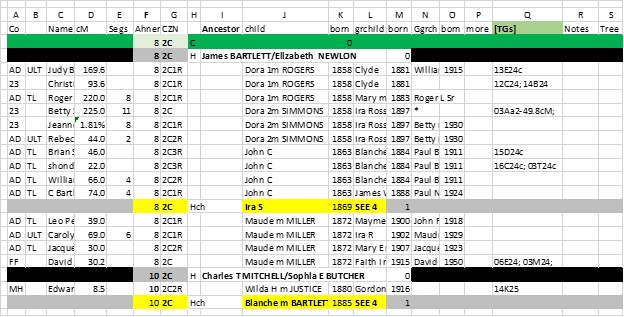
COMMON ANCESTOR MATCHES – Names of all Matches who have a Common Ancestor(s) with me. Key data: Name, Admin, cM, #Segs, Company, CA Ahnentafel #, Cousinship, columns for name and birth year of child, grandchild and great grandchild of CA (for Match’s line of descent); hyperlink to Tree. I also have columns for TG or Cluster, GEDmatch #; Remarks. I also have columns to indicate (to me) if I’ve filled in the Notes box of the Match, entered the line of descent to the Match in my Tree… Main sort is by Ahnentafel # and dates of Child, Grchild – this sort looks like a Family Group Sheet – and is very helpful in tracking TGs and Clusters. It also lets me focus on family groups which often group together in TGs or Clusters.
TG MASTER – Match name, company, Admin, email, Segment info (Chr, Start, End, cM, SNPs), TG ID, Side (M or P), CA info (Ahnentafel #, Surnames of Couple, Cousinship, Tree hyperlink); GEDmatch #; date. If you plan this type of spreadsheet for other people, add a column for initials of test taker (you can then, briefly, combine spreadsheets, do analyses, then separate them again – one spreadsheet per person). Advanced: I have columns for each of 10 generations, and enter my Ahnentafel #s from my parent (2 or 3) out to the CA – this helps me analyze multiple CAs in a TG. Headers: 46 Chromosome bars (rows to separate data); TG bars (that summarize the Chr, Start and End of each TG and the CA) – sometimes there are multiple bars – I highlight the most likely. Main sort: by Side, Chr, Start (this will arrange all Shared Segments into their respective TGs – which should have one Ancestral line)
TG SUMMARY – Chr, Start, End, TGID, Side, columns for 8 generation of Ahnentafel #; Cousinship, CA Surnames; NO Matches. This is a summary subset of the TG MASTER – except I fill in only the Ahnentafel # for known CAs out to most likely distant CA. In italics, add in Ahnentafel #s from Cluster analysis compared to known TGs – this often extends the evidence in the TG (this is an experimental spreadsheet at this point. Sort: Side, Chr, Start .For me, this is a handy 2-page crib sheet.
WALK THE CLUSTERS BACK – a fairly technical tool. Start with a download of Excel data for Clusters based on a 50cM threshold (from DNAGEDcom Client). This will include Match name, cM and any Notes you’ve entered for each Match – this Note info is very valuable to have in this WTCB spreadsheet. Add columns for Ahnen (or CA Surnames) and a TG or Cluster (CL) code and Remarks. Finally add a column for serial # of each row (1 to how many rows you have at that threshold – so after a sort, you can reconstruct the original Cluster groups – just type a 1 at the top and drag it down in a series) – call this column CL50. And add another column – called CL# – and add in the Cluster # for each Match (I wish DGC would include this in the download spreadsheet. Then the work is to determine the Ahnentafal/CA and/or TG CL ID for as many Clusters as possible (hopefully your Notes will show you all the info you’ve collected about each Match). Add a summary row for each Cluster (using 0.4 in the serial number column – now when you sort on CL# and CL50, all the Clusters will be grouped with a header. IF there appears to be a consensus for the Ahnentafel/Surname and/or the TG/CL columns, enter that in this header row. Next, rerun the Cluster report with 45cM threshold – add two new columns for serial # in a new CL45 column and the Cluster # in the new CL# column. As before, add in a header row for each Cluster with 0.4 in the CL45 column and the Cluster # in the CL# column. Now add this spreadsheet to the CL50 spreadsheet, sort on Match name, and combine duplicate Matches onto one row (Matches in both CL50 and CL45 runs will have two Cluster #s and two serial #s – don’t worry. Resort on CL# and CL45 to get all the Matches in Cluster order again, with the added info from CL 50. Again, analyze each Cluster with a goal of finding the CA and/or TG/CL for most Clusters (for the Cluster header rows. If advantageous to see where a new Cluster is going, make a duplicate copy of Match rows which have strong affinity for other Clusters (and code it with the other Cluster number) – use to help identify CA for new Clusters. This is very much a judgment call, which will be confirmed or refuted in follow-on Cluster runs. Drop the cM threshold by 5cM and repeat. The number of Matches begins to increase dramatically – it’s a lot of work. But the benefit is that you are imputing Ancestral lines to many Matches who are Private or have little/no Tree. If you add the imputed into to the Notes of these Matches, they will show up in Shared Match lists and “flavor” them with an Ancestral line. Again – this process is experimental and requires us to use judgment. Future investigation – the Clusters from different companies should be roughly the same – it would be great to be able to link Ancestry Clusters (with many MRCAs) with Clusters from 23andMe, FTDNA, MyHeritage and GEDmatch (with TGs)…
Apologies – this WTCB “short” summary got a lot longer than I originally intended. I’ll have to post a more complete version later. The takeaway is: gradually reduce the cM threshold of Cluster runs and trace the Ancestry from the initial grandparents on out the ancestral lines, using new, smaller Matches which are often more distant cousins with more distant MRCAs. Think of a time-lapse movie of a plant growing, with new limbs branching out over time. If (when) we see a Match with an MRCA which is clearly out of whack with the “history” of the Cluster, it’s time to see if that Match would better be relocated to a different Cluster (per the gray cells) or a different MRCA needs to be found. It is OK to move a Match to a more probable Cluster if it has a lot of Shared Matches with that Cluster, too. We can use our judgment…
[35B] Segment-ology: Genetic Genealogy Spreadsheets; by Jim Bartlett 20211207
 segment-ology